

Setting Up Cost Centres and Revenue Centres
Sage Pastel Partner provides a useful way to track and analyze cost centres and revenue centres through the Projects function. This feature allows businesses to allocate costs and revenues to specific parts of the business without expanding the general ledger. Below is a detailed tutorial on how to set up cost centres or revenue centres in Sage Pastel Partner using the Projects function.
Step-by-Step Guide
- Open Sage Pastel Partner:
- Launch Sage Pastel Partner on your computer.
- Log in with your credentials.
- Access the Projects Function:
- From the main menu, navigate to the Edit menu.
- Select Projects from the dropdown list.
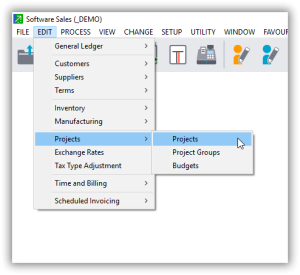
- Create a New Project (Cost Centre or Revenue Centre):
- Click on the Add button to create a new project.
- A new window will appear for project details.
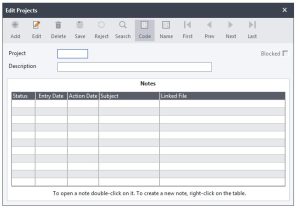
- Enter Project Details:
- Project Code: Enter a unique code for the cost centre or revenue centre.
- Project Description: Provide a descriptive name for the project (e.g., Marketing Department, Sales Division).
- Start Date and End Date: If applicable, enter the start and end dates for the project. These fields can be left blank if the project is ongoing.
- Status: Set the status of the project (e.g., Active, Inactive).
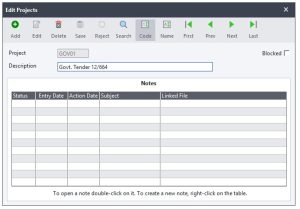
- Save the Project:
- After entering all the necessary details, click on the Save button to store the project.
- Repeat for Additional Cost/Revenue Centres:
- Repeat steps 3 to 5 for each cost centre or revenue centre you need to create.
- Assigning Transactions to Projects:
- When entering transactions in Sage Pastel Partner, you can allocate them to the appropriate project (cost centre or revenue centre).
- In the transaction entry screen (e.g., journal entries, supplier invoices), you will see a field for Project Code.
- Select the relevant project code from the dropdown list to allocate the transaction to the appropriate cost centre or revenue centre.
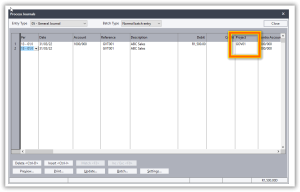
- Reporting and Analysis:
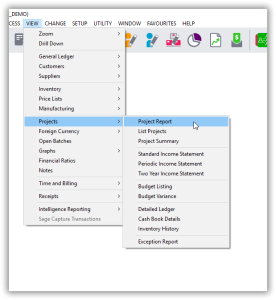
- To analyze the data for specific cost centres or revenue centres, navigate to the View menu.
- Select Reports and choose the the project report you need (e.g., Income Statement, Expense Report).
- Filter the report by project code to see the financial data specific to each cost centre or revenue centre.
Tips for Using Projects as Cost/Revenue Centres
- Flexibility: You can start and stop using projects at any time without affecting the general ledger.
- Optional Use: Projects are optional for each transaction, allowing you to use them only when needed.
- Detailed Analysis: Use project codes to gain insights into specific areas of your business, helping you make informed financial decisions.
By following these steps, you can effectively set up and manage cost centres and revenue centres in Sage Pastel Partner, enabling better financial tracking and analysis within your business.
Usefulness of Projects Function in Sage Pastel Partner
The Projects function in Sage Pastel Partner is a powerful tool for businesses to track and analyze financial data related to specific cost centres and revenue centres. Here’s an in-depth look at how this functionality can benefit your business:
1. Enhanced Financial Analysis
By using projects, businesses can gain detailed insights into the performance of specific areas within the organization. This allows for more precise tracking of income and expenses associated with particular departments, activities, or initiatives. For example, a business can track the profitability of its marketing campaigns, sales divisions, or specific customer projects.
2. Improved Budget Management
Projects enable businesses to allocate budgets to specific cost centres or revenue centres. This makes it easier to monitor actual spending against budgeted amounts, ensuring that resources are used efficiently and financial targets are met.
3. Flexibility and Control
- Non-Disruptive: Projects do not increase the size of the general ledger, maintaining its simplicity and manageability.
- Optional Usage: Businesses are not required to use projects for every transaction. This means you can selectively apply them to relevant transactions without complicating routine accounting processes.
- Dynamic: Projects can be started and stopped at any time, providing flexibility to adapt to changing business needs without long-term commitments or extensive adjustments to the accounting system.
4. Detailed Reporting
Projects allow for detailed and specific reporting. Businesses can generate reports that focus on particular projects, providing insights into financial performance at a granular level. This is particularly useful for:
- Cost Analysis: Identifying and controlling costs within specific areas.
- Revenue Tracking: Monitoring revenue streams from distinct activities or segments.
- Performance Measurement: Evaluating the success and ROI of various projects or departments.
5. Strategic Decision Making
With the ability to track financial data at a detailed level, management can make more informed decisions. This includes:
- Resource Allocation: Determining where to allocate resources for maximum impact.
- Identifying Trends: Recognizing trends and patterns within specific areas of the business.
- Corrective Actions: Taking corrective actions in areas where performance is not meeting expectations.
6. Simplified Accounting
Using the Projects function simplifies accounting processes by segregating financial data without complicating the general ledger. This makes it easier for accountants and financial managers to:
- Organize Data: Keep financial data organized and easily accessible.
- Reduce Errors: Minimize the risk of errors by clearly defining financial transactions associated with specific projects.
7. Compliance and Accountability
Projects help in maintaining compliance and accountability within the organization. By tracking expenses and revenues against specific cost centres or revenue centres, businesses can ensure that funds are used appropriately and within approved limits. This is particularly important for organizations that need to adhere to strict financial regulations or internal policies.
8. Support for Project-Based Work
For businesses that operate on a project basis, such as construction firms, consulting agencies, or marketing companies, the Projects function is indispensable. It provides a clear structure for tracking project-specific financials, ensuring that each project’s profitability and performance can be accurately measured.
Conclusion
The Projects function in Sage Pastel Partner offers significant advantages for businesses looking to enhance their financial tracking and analysis capabilities. By leveraging this feature, businesses can achieve greater financial control, more detailed insights, and improved decision-making, ultimately leading to better overall financial health and performance.

