

Deleting Inactive Inventory Items
Welcome to this lesson on how to delete inactive inventory items in Sage Pastel Partner. In this guide, you will learn how to remove inventory items that are no longer needed. Follow the steps below to complete this task.
Step-by-Step Instructions
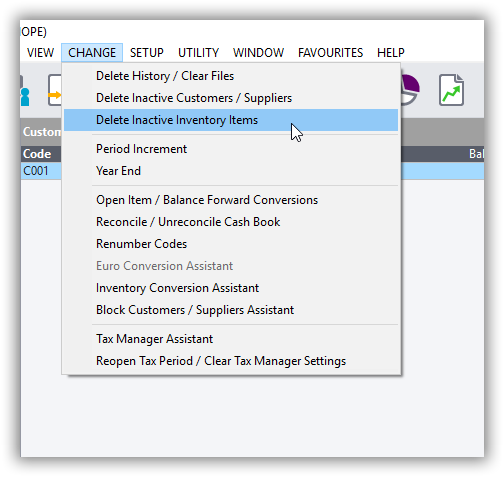
Step 1: Access the Delete Inactive Inventory Items Feature
- Click on “Change”:
- Open Sage Pastel Partner.
- Navigate to the menu and click on “Change”.
- Select “Delete Inactive Inventory Items”:
- In the dropdown menu, select “Delete Inactive Inventory Items”.
Step 2: Enter Password
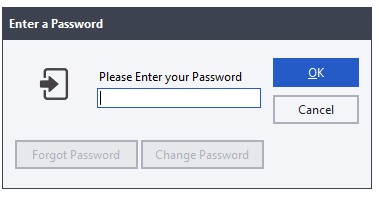
- Enter the Password:
- A prompt will appear asking for your password.
- Enter your password in the provided field and click “OK” to continue.
Step 3: Use the Delete Inventory Assistant
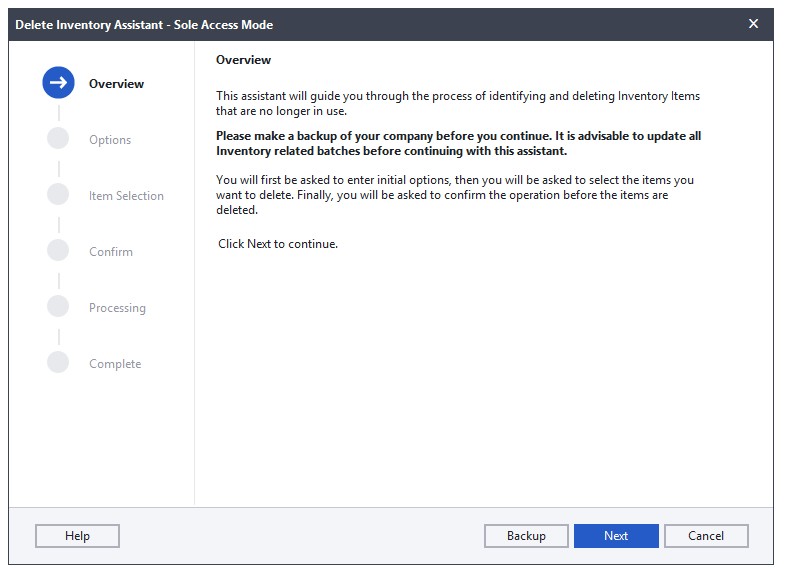
- Read the Notes:
- You will be taken to the “Delete Inventory Assistant” window.
- Carefully read through the notes provided on this screen.
- Click “Next”:
- After reading the notes, click the “Next” button to proceed.
Step 4: Set the Inactive Before Date
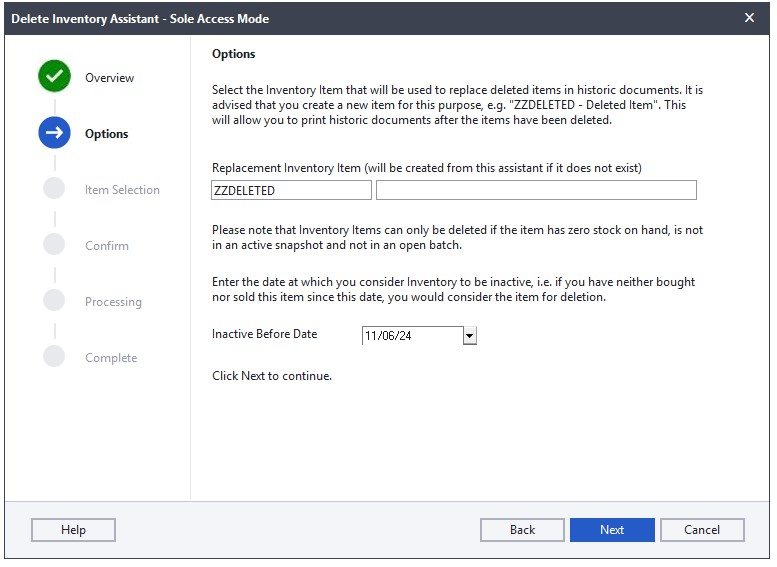
- Read the Options Notes:
- You will be taken to the “Options” window.
- Read through the notes on this screen.
- Select the “Inactive Before” Date:
- Choose the date before which the inventory items should be considered inactive.
- Click “Next”:
- Once you have selected the date, click the “Next” button to continue.
Step 5: Select Inventory Items to Delete
- Choose Inventory Items:
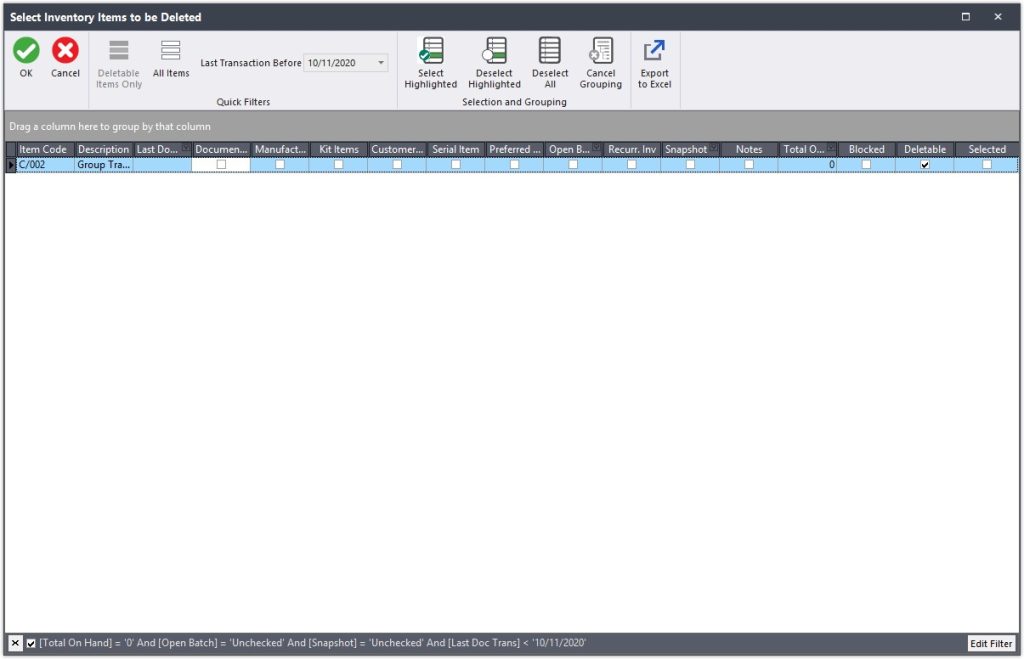
- You will be taken to the “Select Inventory Items to be Deleted” window.
- Tick the checkbox next to the inventory items you want to delete.
- Click “OK”:
- After selecting the items, click “OK” to proceed.
Step 6: Confirm and Process the Deletion
- Read the Confirmation Notes:
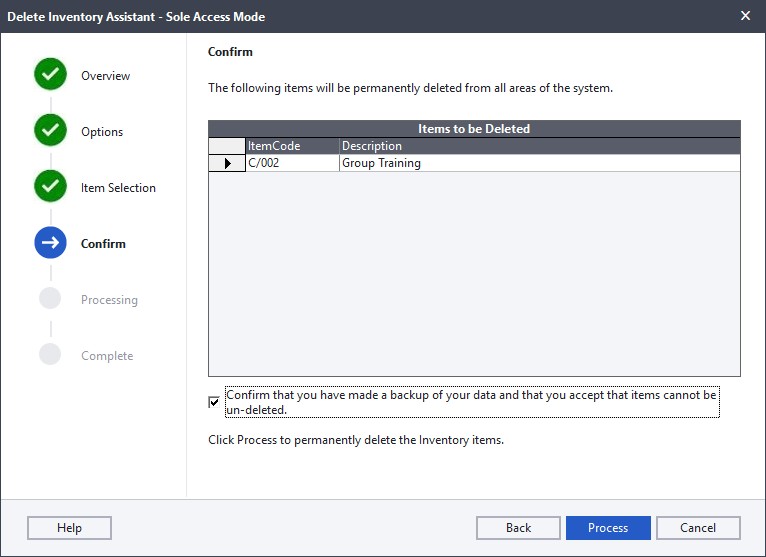
- You will be taken to the “Confirm” window.
- Read through the notes carefully.
- Backup Confirmation:
- Tick the checkbox to confirm that you have done a backup of your data.
- Click “Process”:
- Click the “Process” button to complete the operation.
Step 7: Finish the Operation
- Allow the Operation to Run:
- Allow the system to run the deletion operation.
- Click “Finish”:
- Once the operation is complete, click the “Finish” button.
Completion
You have now successfully deleted inactive inventory items in Sage Pastel Partner.
Why Delete Inactive Inventory in Sage Pastel Partner?
Managing inventory efficiently is crucial for any business. Over time, inventory records can become cluttered with items that are no longer in use or relevant. Deleting inactive inventory items in a system like Sage Pastel Partner offers several benefits:
1. Improved System Performance
- Faster Processing: Removing inactive items reduces the amount of data the system has to process, leading to quicker report generation and overall system responsiveness.
- Reduced Clutter: A streamlined database with only active items makes it easier to navigate and manage inventory.
2. Accurate Inventory Management
- Updated Inventory Data: Deleting items that are no longer in stock or no longer being sold ensures that inventory data is accurate and up-to-date.
- Better Decision Making: Accurate data helps in making informed decisions about purchasing, stocking, and sales strategies.
3. Simplified Reporting
- Relevant Reports: Reports generated from the system will reflect only active inventory items, making them more relevant and easier to interpret.
- Efficiency in Audits: During audits, having a clean and current inventory list simplifies the process and reduces the chances of discrepancies.
4. Cost Savings
- Storage Costs: Reducing the number of items in the system can lower data storage costs, especially for businesses with large inventories.
- Maintenance Costs: A smaller, more manageable database reduces the time and effort required for system maintenance and backups.
5. Enhanced User Experience
- Easier Searches: Users can find the items they need more quickly without having to sift through outdated or inactive entries.
- Streamlined Workflows: With less clutter, employees can focus on current and actionable items, improving overall productivity.
6. Regulatory Compliance
- Data Retention Policies: Some industries have regulations regarding the retention and deletion of data. Regularly deleting inactive items can help ensure compliance with these regulations.
- Accurate Record Keeping: Maintaining an accurate inventory record is often a requirement for financial and tax reporting.
7. Inventory Optimization
- Identify Trends: By removing inactive items, businesses can better analyze sales trends and identify which products are performing well.
- Space Management: Physically, it helps in warehouse space management by focusing only on current and necessary stock.
Conclusion
Regularly deleting inactive inventory items in Sage Pastel Partner is a best practice that enhances system performance, improves inventory accuracy, and supports better business decisions. It ensures that your inventory management processes remain efficient and effective, ultimately contributing to the overall success of your business.

