

Processing a Bank Transfer Between Two Cash Books
Welcome to this detailed lesson on how to process a bank transfer between two cash books using Sage Pastel Partner. From time to time, you may need to transfer money from one bank account to another. Using the Cashbook Transfer Wizard, you can easily record transfers that take place between two bank accounts owned by the company. This is a three-stage process:
Stage 1: Creating the Inter-Bank Transfer Account
Stage 2: Setting Up the Inter-Bank Transfer Account
Stage 3: Processing the Transfers Between Banks
In this lesson, we will start with creating the inter-bank transfer account. Follow these steps carefully:
Stage 1: Creating the Inter-Bank Transfer Account
Step-by-Step Guide
- Open Sage Pastel Partner.
- Click on
Editin the main menu. - Click on
General Ledger. - Click on
Accounts.
- You will be taken to the Edit General Ledger Accounts window.
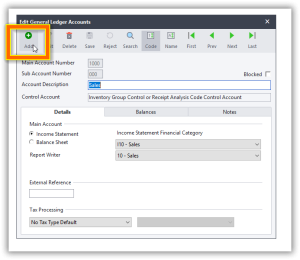
- Click on
Add. - Enter the Main Account Number.
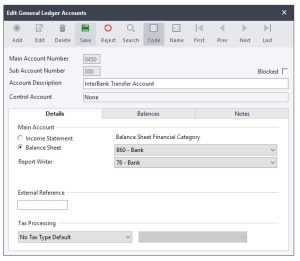
- This is a four-digit number decided by you. For this lesson, we will use
8450.
- This is a four-digit number decided by you. For this lesson, we will use
- The Sub Account defaults to
000. - Enter the Account Description.
- For this lesson, use
Inter Bank Transfer Account.
- For this lesson, use
- Click the
Detailstab. - Under Main Account, select the Account Type.
- Choose
Balance Sheet.
- Choose
- Under Balance Sheet Financial Category, select
Bank. - On Report Writer Category, select
Bank. - Click
Save
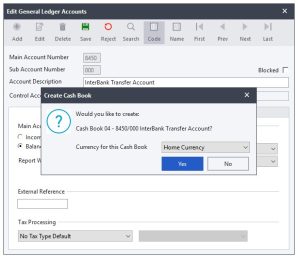
The system will prompt you if you want to create an additional cashbook-Click NO
Congratulations! You have successfully created the inter-bank transfer account. Next, we will move on to setting up the bank transfer account.
Stage 2: Setting Up the Inter-Bank Transfer Account
This part of the lesson will guide you through setting up the inter-bank transfer account, preparing it for use in processing bank transfers.
Step-by-Step Guide
- Open Sage Pastel Partner.
- Click on
Editin the main menu. - Click on
General Ledger. - Click on
Accounts. - Locate the Inter Bank Transfer Account you just created.
- Configure the necessary settings for the account as per your company’s requirements.
Note: Detailed instructions for configuring the inter-bank transfer account can vary based on specific requirements and company policies. Ensure all necessary details are accurately filled in.
Stage 3: Processing the Transfers Between Banks
This final part of the lesson will show you how to process transfers between the banks using the Cashbook Transfer Wizard.
Step-by-Step Guide
- Open Sage Pastel Partner.
- Click on
Cashbook. - Click on
Transfers.You will be taken to the Cashbook Transfer Wizard. - Select the Source Bank Account.
- Select the Destination Bank Account.
- Enter the Amount to Transfer.
- Enter the Date of the Transfer.
- Provide any additional details or descriptions necessary for the transfer.
- Review the details and confirm the transfer.
- Click
Processto complete the transfer.
Implications of Interbank Transfers
Interbank transfers, which involve moving funds from one bank account to another within the same organization, have significant implications for various aspects of financial management and accounting within a company. Understanding these implications is crucial for maintaining accurate financial records and ensuring smooth financial operations. Below, we explore the key implications of interbank transfers.
1. Accurate Financial Reporting
Implication: Properly recording interbank transfers ensures that financial statements accurately reflect the company’s financial position.
- Balance Sheet Accuracy: Interbank transfers affect the balance sheet by changing the cash balances of the involved bank accounts without affecting the overall cash balance of the company. Accurate recording prevents discrepancies and ensures that the total cash position is correctly reported.
- Audit Trails: Accurate records provide clear audit trails, making it easier for auditors to verify transactions and for the company to comply with regulatory requirements.
2. Cash Flow Management
Implication: Effective management of interbank transfers aids in optimizing cash flow.
- Liquidity Management: Transferring funds between accounts allows a company to ensure that sufficient funds are available in the necessary accounts to cover expenses, investments, or operational needs. This helps in avoiding overdraft fees and maintaining adequate liquidity.
- Interest Maximization: By strategically moving funds between accounts, a company can take advantage of accounts that offer higher interest rates, thereby maximizing interest income.
3. Operational Efficiency
Implication: Streamlined processes for interbank transfers improve operational efficiency.
- Automated Transfers: Utilizing tools like the Cashbook Transfer Wizard in Sage Pastel Partner can automate and streamline the transfer process, reducing the likelihood of manual errors and saving time for the accounting staff.
- Reduced Errors: Proper setup and use of interbank transfer accounts minimize the risk of errors, such as duplicate entries or incorrect amounts, which can complicate reconciliations and financial reporting.
4. Reconciliation
Implication: Regular interbank transfers necessitate diligent bank reconciliation practices.
- Consistency: Ensuring that all interbank transfers are recorded accurately helps maintain consistency in bank reconciliations. This makes it easier to identify and resolve discrepancies between the bank statements and the company’s cash book.
- Timeliness: Regular and timely reconciliation of interbank transfers ensures that any issues or errors are identified and corrected promptly, maintaining the integrity of financial records.
5. Internal Controls
Implication: Interbank transfers necessitate robust internal controls to prevent fraud and errors.
- Authorization: Implementing approval workflows for interbank transfers can prevent unauthorized transfers, reducing the risk of fraud.
- Segregation of Duties: Ensuring that different personnel are responsible for initiating, approving, and recording transfers helps in maintaining a system of checks and balances.
6. Budgeting and Forecasting
Implication: Accurate recording of interbank transfers supports effective budgeting and forecasting.
- Cash Flow Projections: Understanding the movement of funds between accounts helps in creating more accurate cash flow projections. This aids in making informed decisions regarding future expenditures and investments.
- Budget Adherence: Tracking interbank transfers helps ensure that actual cash flows align with budgeted figures, allowing for better financial control and management.
Conclusion
Interbank transfers, when properly managed and recorded, contribute significantly to the accuracy of financial reporting, the efficiency of cash flow management, and the overall operational efficiency of a company. Utilizing tools like Sage Pastel Partner’s Cashbook Transfer Wizard facilitates the accurate and efficient execution of these transfers. However, it is essential to maintain robust internal controls and regular reconciliation practices to fully realize the benefits and minimize potential risks associated with interbank transfers.

