

A Step-by-Step Guide
In this article, we’ll walk you through the process of creating customer accounts in Sage Pastel Partner. Creating customer accounts on Sage Pastel Partner is essential for maintaining organized financial records, managing customer relationships effectively, and ensuring compliance with regulatory standards. It enables businesses to track transactions, manage credit, streamline operations, and make informed decisions based on accurate financial data.
Getting Started
To begin creating customer accounts, follow these steps:
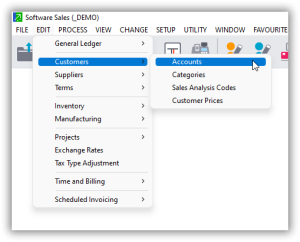
- Navigate to the Customer Accounts Section:
- Click on Edit.
- Select Customers.
- Choose Accounts.
- The system will load the Edit Customer Accounts window.
Understanding the Edit Customer Accounts Window
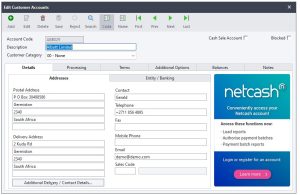
In this window, you’ll find several buttons and fields essential for managing customer accounts:
- Add/Edit/Delete Buttons:
- Add: Create a new customer account.
- Edit: Modify an existing customer account.
- Delete: Remove a customer account (Note: Do not delete accounts with posted transactions).
- Save: Save the details of a customer account.
- Reject: Discard changes before saving.
- Search: Find a customer by account code or name.
- Navigation Buttons: Move to the first, last, previous, or next customer account in the list.
- Account Code: Enter a unique code for the customer.
- Description: Provide the customer’s name.
- Customer Category: Select the appropriate category (e.g., Individual or Corporate).
Entering Customer Details
Let’s break down the process into manageable steps, starting with the Details tab.
- Details Tab:
- Account Code: Enter a unique code (e.g., CA001).
- Description: Enter the customer’s name (e.g., Makonde Enterprises Pvt Ltd).
- Customer Category: Select the appropriate category (e.g., Corporate).
- Postal Address: Enter the postal address (e.g., P.O. Box 2010, Harare Main Post Office, Harare).
- Physical Address: Enter the physical address (e.g., 43A Steve Biko Drive, Masasa).
- Contact Person: Enter the name of the contact person (e.g., Prospect Tama).
- Phone Number: Enter the business phone number (e.g., 0242-123456).
- Mobile Number: Enter the mobile number if available.
- Email: Enter the business email address.
- Sales Representative:
- Select the sales representative who handles this customer.
- Use the code or description to find the representative.
Additional Tabs
Once you’ve filled out the Details tab, proceed with the following tabs:
- Processing Tab:
- Currency: Select the home currency.
- Processing Method: Choose Open Item to link payments to specific invoices, ensuring accurate age analysis reports.
- Terms Tab:
- Adjust terms if necessary (e.g., credit limits, early payment terms).
- Additional Options Tab:
- Usually, no changes are needed here.
- Balances Tab:
- This tab shows transactions for the customer (empty for new customers).
- Notes Tab:
- Add any notes relevant to the customer account.
Final Steps
- Save the Customer Account:
- Once all details are entered, click on Save to create the customer account.
- Creating Another Account:
- Click on Add to start creating another customer account.
Creating customer accounts in Sage Pastel Partner is crucial for several reasons:
- Transaction Tracking: Customer accounts allow you to track all transactions related to a specific customer in one place. This includes sales, payments, credits, and refunds. By organizing transactions within customer accounts, you can easily monitor customer activity and history.
- Accuracy in Financial Reporting: Customer accounts provide accurate data for financial reporting and analysis. With each transaction recorded against the respective customer account, you can generate detailed reports such as sales summaries, aging analysis, and customer statements. This level of detail ensures accurate financial reporting and helps in decision-making processes.
- Credit Management: Customer accounts help in managing credit terms and limits effectively. You can set credit limits for individual customers and monitor their outstanding balances. This helps in controlling credit risk and ensures timely payment collections.
- Customer Relationship Management (CRM): Maintaining customer accounts facilitates better customer relationship management. You can store contact information, preferences, and notes about individual customers, enabling personalized communication and service delivery. This strengthens customer relationships and fosters loyalty.
- Efficient Order Processing: Customer accounts streamline the order processing workflow. By associating each order with a specific customer account, you can easily process orders, generate invoices, and track deliveries. This enhances operational efficiency and reduces errors in order fulfillment.
- Compliance and Audit Trail: Customer accounts contribute to regulatory compliance and audit trail requirements. By accurately recording all customer-related transactions, Sage Pastel Partner helps in demonstrating compliance with accounting standards and regulatory requirements. Additionally, it provides an audit trail for internal and external audits, ensuring transparency and accountability.
In summary, creating customer accounts on Sage Pastel Partner is essential for maintaining organized financial records, managing customer relationships effectively, and ensuring compliance with regulatory standards. It enables businesses to track transactions, manage credit, streamline operations, and make informed decisions based on accurate financial data.

