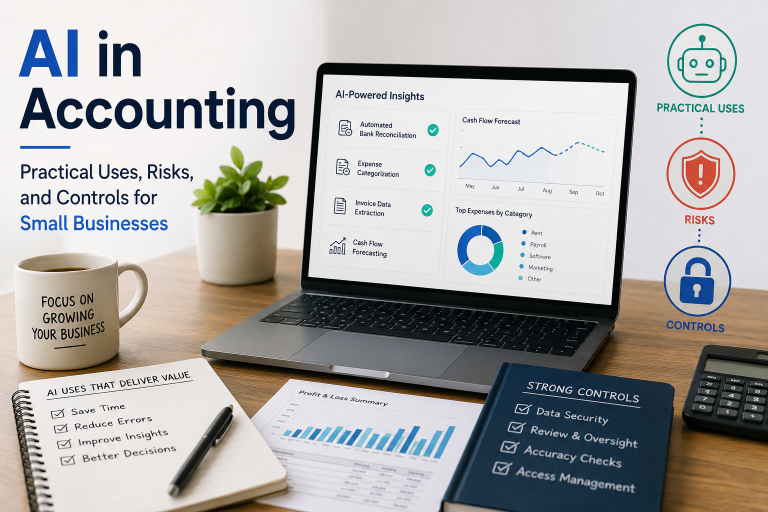
AI in Accounting: Practical Uses, Risks, and Controls for Small Businesses
The coffee shop’s morning rush was winding down when Marcus Williams glanced at his laptop screen, dreading the accounting tasks that awaited him. As the owner of a successful chain of three coffee shops, Marcus had built his business through passion for great coffee and genuine customer relationships. But the administrative side—tracking inventory across three locations, managing supplier invoices, reconciling bank statements, and preparing for tax season—consumed precious hours that he’d rather spend innovating new menu items or connecting with customers. The irony wasn’t lost on him: he was drowning in paperwork while trying to grow a business that thrived on human connection. As he manually entered yet another supplier invoice, Marcus received a text from his accountant asking about missing receipts and irregularities in his expense reports. The familiar knot of anxiety tightened in his stomach as he realized he was spending more time chasing paperwork than running his business. That evening, while scrolling through social media during a rare quiet moment, Marcus discovered artificial intelligence tools specifically designed for small business accounting. The promise seemed too good to be true—automated data entry, intelligent categorization, and real-time financial insights. But as a cautious businessman who had seen countless “revolutionary” solutions fail to deliver, Marcus approached the idea with both hope and skepticism. This discovery would set him on a path that would transform not just his accounting processes, but his entire approach to business management and technology adoption.
The Dawn of a New Era: Understanding AI in Accounting Context
The integration of artificial intelligence into accounting represents one of the most significant shifts in business operations since the introduction of double-entry bookkeeping. Unlike previous technological advances that simply automated existing processes, AI fundamentally changes how we approach accounting tasks, creating new possibilities while simultaneously introducing unprecedented challenges.
The Evolution of Business Automation
To understand AI’s impact on accounting, we must first appreciate the journey that brought us here. Small business owners like Marcus have witnessed multiple waves of automation: the transition from handwritten ledgers to calculators, the introduction of basic accounting software, the shift to cloud-based platforms, and now the emergence of AI-powered solutions. Each wave promised efficiency gains, but AI represents a quantum leap in capability and complexity.
Traditional accounting software required manual input and rule-based processing. Users had to tell the system exactly what to do, following predetermined workflows and procedures. AI, however, learns from patterns, adapts to new situations, and can make predictions based on vast datasets. This capability shift creates opportunities for small businesses to access sophisticated analytical tools previously available only to large corporations, but it also introduces new considerations around data privacy, accuracy, and control.
The Current State of Small Business Accounting
Small businesses represent the backbone of the global economy, employing millions and driving innovation across industries. Yet many still struggle with outdated accounting practices that consume valuable time and resources. According to industry surveys, small business owners spend an average of 20 hours per month on accounting tasks, time that could be better spent growing their business or serving customers.
Marcus’s experience reflects a common pattern: passionate entrepreneurs who excel at their core business but struggle with administrative tasks. The accounting burden often falls to the business owner personally, creating a bottleneck that limits growth potential. Even businesses that hire external accountants still face challenges with data organization, document management, and real-time financial visibility.
Practical AI Applications: Transforming Daily Operations
Automated Data Entry and Receipt Processing
One of the most immediate and impactful uses of AI in small business accounting is automated data entry. Traditional methods require manual transcription of information from invoices, receipts, and bank statements—a process that’s both time-consuming and prone to human error. AI-powered optical character recognition (OCR) and machine learning algorithms can extract relevant information from various document formats, significantly reducing manual effort.
For Marcus, this meant photographing supplier receipts with his smartphone and having the AI system automatically extract vendor names, amounts, dates, and category information. The system learned from his previous entries, becoming more accurate over time and reducing the need for manual verification. What once took 30 minutes per day across three locations now required just 10 minutes, with higher accuracy rates.
However, the emotional impact of this transformation extended beyond time savings. Marcus experienced a profound sense of relief as the anxiety associated with manual data entry diminished. The fear of making transcription errors that could affect tax compliance or supplier relationships gave way to confidence in the AI system’s accuracy. This emotional shift allowed him to focus mental energy on strategic business decisions rather than administrative details.
Intelligent Transaction Categorization
AI systems can learn from historical transaction patterns to suggest appropriate categories for new entries. This capability becomes particularly valuable when dealing with complex business structures or diverse revenue streams. The system analyzes transaction descriptions, amounts, and vendor information to recommend the most appropriate accounting category.
Consider a restaurant owner who receives a charge labeled “Fresh Produce Co.” The AI system, having learned from previous transactions, can automatically categorize this as “Cost of Goods Sold – Food” rather than requiring manual selection from multiple options. Over time, the system becomes increasingly accurate, reducing categorization errors and improving financial reporting quality.
Predictive Analytics and Cash Flow Forecasting
Perhaps one of the most valuable AI applications for small businesses is predictive analytics. Traditional accounting systems provide historical data and basic trend analysis, but AI can analyze complex patterns and predict future cash flow needs, seasonal variations, and potential financial challenges.
Marcus discovered that his AI accounting system could predict cash flow shortages up to 30 days in advance, allowing him to arrange financing or adjust spending before problems arose. The system analyzed historical sales patterns, seasonal variations, supplier payment cycles, and tax obligations to create accurate forecasts. This capability transformed Marcus from a reactive business owner to a proactive planner, reducing stress and improving decision-making.
Fraud Detection and Anomaly Identification
AI systems excel at identifying unusual patterns that might indicate fraudulent activity or accounting errors. By analyzing normal transaction patterns, the system can flag deviations that warrant investigation. This capability provides small business owners with enterprise-level security features previously available only to large corporations.
The emotional security provided by AI-powered fraud detection cannot be overstated. Marcus found peace of mind knowing that the system monitored his accounts 24/7, alerting him to suspicious activities that he might miss during busy periods. This security blanket allowed him to focus on business growth without constant worry about financial irregularities.
The Promise: Benefits That Transform Small Businesses
Time Savings and Productivity Gains
The most immediate benefit of AI in accounting is the dramatic reduction in time spent on routine tasks. Small business owners report saving 10-20 hours per month on accounting activities, time that can be redirected toward revenue-generating activities or strategic planning.
For Marcus, this translated to more time for menu development, staff training, and customer engagement—activities that directly impacted his business’s competitive advantage. The productivity gains weren’t just quantitative; they were qualitative, allowing Marcus to engage in higher-value activities that leveraged his unique skills and expertise.
Enhanced Accuracy and Error Reduction
Human error is inevitable in manual accounting processes. AI systems, while not perfect, generally achieve higher accuracy rates than manual entry, especially as they learn from corrected mistakes. This improved accuracy reduces the time spent on corrections and reconciliation, while also minimizing the risk of compliance issues.
Marcus experienced this benefit when the AI system caught a recurring supplier charge that had been incorrectly categorized for six months. The system’s pattern recognition identified the anomaly and prompted Marcus to investigate, revealing an error that had affected his financial reporting and tax calculations. The emotional relief of discovering and correcting this error before it became a compliance issue was immense.
Real-Time Financial Insights
Traditional accounting systems provide periodic updates, often with significant delays between transactions and reporting. AI-powered systems can provide real-time financial insights, giving business owners immediate visibility into their financial position.
Marcus found himself checking his financial dashboard multiple times per day, gaining insights that informed immediate business decisions. When sales dropped unexpectedly on a Tuesday, he could immediately assess the impact on cash flow and adjust operations accordingly. This real-time visibility created a sense of control and confidence that enhanced his decision-making capabilities.
Scalability Without Complexity
As businesses grow, traditional accounting systems often become increasingly complex and resource-intensive. AI systems can scale with business growth without proportional increases in administrative burden. The system handles increased transaction volumes and complexity automatically, maintaining efficiency as the business expands.
This scalability proved crucial when Marcus opened his fourth location. Rather than doubling his accounting workload, the AI system seamlessly integrated the new location’s data, providing consolidated insights across all locations. The emotional relief of scaling without proportional complexity increases allowed Marcus to focus on growth rather than administrative challenges.
The Perils: Understanding and Mitigating Risks
Data Privacy and Security Concerns
The most significant concern for small business owners considering AI accounting solutions is data privacy and security. AI systems require access to sensitive financial information, and business owners must carefully evaluate how their data is handled, stored, and protected.
Marcus initially hesitated to adopt AI accounting due to security concerns. His business handled credit card transactions, employee payroll information, and vendor payment details—data that could be devastating if compromised. The emotional weight of protecting customer and employee data created significant anxiety about moving to cloud-based AI solutions.
To address these concerns, Marcus thoroughly researched potential vendors, examining their security certifications, data handling practices, and breach history. He looked for solutions with end-to-end encryption, multi-factor authentication, and compliance with relevant regulations like GDPR or SOX requirements. The due diligence process was time-consuming but provided the peace of mind necessary for adoption.
Algorithmic Bias and Accuracy Issues
AI systems learn from historical data, which can introduce biases that affect future recommendations and classifications. For small businesses with limited transaction histories, these biases can be particularly problematic, leading to inaccurate categorizations or misleading insights.
Marcus experienced this challenge when the AI system consistently misclassified a particular supplier’s invoices due to insufficient learning data. The system had learned from a limited sample and applied incorrect patterns to new transactions. The emotional frustration of correcting repeated errors reminded Marcus that AI systems require ongoing monitoring and adjustment.
Dependency and System Reliability
As businesses become reliant on AI accounting systems, any system failures or service interruptions can have significant impacts. Small businesses often lack backup systems or alternative processes, making them vulnerable to service disruptions.
Marcus learned this lesson during a planned system upgrade that temporarily disrupted service. Without access to his AI accounting system, he reverted to manual processes and realized how dependent he had become on the technology. The experience highlighted the importance of maintaining basic manual capabilities and having contingency plans for system failures.
Cost Considerations and ROI Uncertainty
While AI accounting solutions promise efficiency gains, the costs can be significant, especially for small businesses with tight budgets. Subscription fees, implementation costs, and training expenses must be weighed against potential benefits.
Marcus carefully calculated the return on investment, considering both direct costs (software subscriptions, training) and indirect benefits (time savings, accuracy improvements, reduced stress). The emotional aspect of this calculation was crucial—while the financial benefits were clear, the peace of mind and stress reduction provided additional value that was harder to quantify but equally important.
Implementation Strategies: Building Effective Controls
Vendor Selection and Due Diligence
Choosing the right AI accounting solution requires careful consideration of multiple factors beyond basic functionality. Small business owners must evaluate vendors based on security practices, reliability, customer support, and long-term viability.
Marcus developed a comprehensive evaluation framework that included:
- Security certifications and compliance standards
- Data handling and privacy policies
- System uptime guarantees and backup procedures
- Customer support availability and quality
- Integration capabilities with existing systems
- Pricing transparency and contract terms
The emotional aspect of vendor selection involved balancing excitement about new capabilities with caution about potential risks. Marcus found that taking time for thorough evaluation reduced anxiety about the decision and increased confidence in the chosen solution.
Data Governance and Management
Effective AI implementation requires robust data governance practices that ensure data quality, consistency, and security. Small businesses must establish clear policies and procedures for data handling, access, and retention.
Marcus implemented data governance practices including:
- Regular data backups and verification procedures
- Access controls limiting who can view or modify financial data
- Data quality checks to identify and correct errors
- Retention policies for different types of financial records
- Audit trails tracking all system access and changes
Training and Change Management
Successful AI implementation requires not just technical setup but effective training and change management. Small business owners and their staff must learn to work with AI systems while maintaining appropriate oversight and control.
Marcus invested time in comprehensive training, learning not just how to use the AI system but how to interpret its outputs and recognize potential issues. The emotional adjustment involved accepting that AI wouldn’t replace human judgment but would augment it, requiring a new type of partnership between human insight and machine processing.
Monitoring and Quality Assurance
AI systems require ongoing monitoring to ensure they continue operating effectively and accurately. Small businesses must establish procedures for regular review and validation of AI-generated outputs.
Marcus established monitoring routines including:
- Daily review of AI-suggested categorizations
- Weekly reconciliation of AI-processed transactions
- Monthly analysis of system accuracy and performance
- Quarterly assessment of system recommendations
- Annual evaluation of overall system effectiveness
Industry-Specific Applications: Tailored Solutions for Different Sectors
Retail and E-commerce
Retail businesses face unique challenges in transaction volume, inventory management, and seasonal variations. AI accounting solutions for retail can automatically process large volumes of transactions, reconcile e-commerce platform data, and provide insights into seasonal patterns and inventory turnover.
Marcus’s coffee shop benefited from retail-specific AI features that tracked inventory levels, predicted restocking needs, and analyzed customer spending patterns. The emotional security of knowing that inventory levels were optimized reduced anxiety about stockouts or waste.
Professional Services
Service-based businesses often deal with complex billing arrangements, project tracking, and client management. AI systems can automate time tracking, generate project profitability reports, and manage client billing cycles.
Manufacturing and Wholesale
Manufacturing businesses require sophisticated inventory management, cost allocation, and production tracking. AI solutions can optimize inventory levels, track production costs, and provide insights into supply chain efficiency.
The Human Element: Maintaining Control and Oversight
Understanding AI Limitations
Small business owners must understand that AI systems, while powerful, have limitations. They cannot replace human judgment in complex situations, ethical decisions, or strategic planning. The key is finding the right balance between automation and human oversight.
Marcus learned to view AI as a powerful assistant rather than a replacement for his business acumen. The system handled routine tasks efficiently, but Marcus maintained responsibility for strategic decisions and complex financial analysis.
Maintaining Critical Thinking Skills
As businesses become more automated, there’s a risk of losing critical thinking skills related to financial analysis and decision-making. Small business owners must maintain their ability to question AI outputs and think independently about business challenges.
Marcus regularly reviewed AI-generated reports with a critical eye, looking for patterns or insights that might not be immediately obvious. This practice helped him maintain his analytical skills while leveraging AI capabilities.
Preserving Business Intuition
While AI provides data-driven insights, business intuition based on experience and market knowledge remains valuable. Successful small business owners learn to integrate AI insights with their own judgment and market understanding.
Future Trends and Considerations
Emerging Technologies and Integration
The AI accounting landscape continues to evolve, with new technologies and integration possibilities emerging regularly. Small business owners must stay informed about developments while maintaining focus on their core business needs.
Regulatory and Compliance Evolution
As AI becomes more prevalent in accounting, regulatory bodies are developing new guidelines and requirements. Small businesses must stay current with compliance obligations while leveraging AI benefits.
Competitive Advantages and Market Positioning
Early adopters of AI accounting can gain significant competitive advantages through improved efficiency, better insights, and enhanced customer service. However, as AI becomes more widespread, these advantages may diminish.
Conclusion: The Path Forward for Small Business Success
The integration of AI into small business accounting represents both an opportunity and a responsibility. Small business owners like Marcus have the chance to dramatically improve their operational efficiency, financial insights, and competitive position through thoughtful AI adoption. However, this opportunity comes with the responsibility to implement appropriate controls, maintain oversight, and preserve the human elements that make their businesses unique.
The emotional journey from manual accounting processes to AI-assisted operations involves navigating anxiety about technology, excitement about possibilities, and satisfaction with improved efficiency. Marcus’s transformation from drowning in paperwork to confidently managing his business finances illustrates the profound impact that thoughtful AI adoption can have on small business success.
The key to success lies not in replacing human judgment with artificial intelligence, but in creating a powerful partnership between human insight and machine capability. When implemented thoughtfully, with appropriate controls and oversight, AI accounting solutions can free small business owners to focus on what they do best—creating value for their customers and building sustainable enterprises.
The future belongs to small businesses that embrace technology while maintaining their human touch, leveraging AI for efficiency while preserving the personal relationships and intuitive understanding that define their competitive advantage. The journey requires courage, careful planning, and ongoing adaptation, but the rewards—in terms of business success, personal satisfaction, and competitive advantage—are well worth the effort.