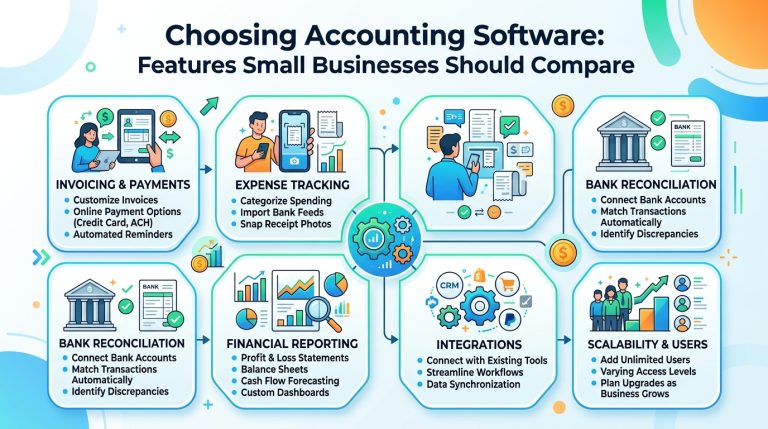
Choosing Accounting Software: Features Small Businesses Should Compare

Choosing Accounting Software: Features Small Businesses Should Compare

For small business owners, accounting software is no longer a digital replacement for a ledger. It is the operational infrastructure that touches invoicing, payroll, inventory, tax compliance, cash flow forecasting, and strategic decision-making. The market, however, is saturated with platforms that promise comprehensive solutions while burying limitations in tiered pricing, integration caps, or region-locked features.

Selecting the wrong system does more than waste budget; it fragments workflows, complicates compliance, obscures profitability, and creates data silos that slow growth. The right platform, conversely, scales with revenue, reduces manual reconciliation, and provides real-time visibility into financial health.

This guide provides a structured, feature-by-feature comparison framework. It cuts through marketing language, highlights what truly matters at different growth stages, and offers a practical evaluation process you can implement immediately.


Core Features Every Small Business Needs

Before evaluating advanced modules, verify that any platform handles these foundational capabilities reliably. These are the non-negotiables for day-to-day financial operations.

Invoicing & Billing Flexibility

What to compare: Recurring invoicing, milestone or progress billing, deposit/retainer tracking, automated late fees, multi-currency support, and integrated client payment portals.
Why it matters: Cash flow constraints are a leading cause of small business failure. Automated billing cycles reduce days sales outstanding (DSO) and eliminate administrative delays.
Practical example: For instance, one mid-sized marketing agency reported that after switching from manual PDF invoicing to a platform with automated milestone billing and integrated payment gateways, their average collection time dropped significantly, and administrative hours dedicated to accounts receivable fell by several hours per week.

Bank Feeds & Automated Reconciliation

What to compare: Direct bank and credit card connectivity, rule-based transaction categorization, duplicate detection, split-transaction handling, and reconciliation workflow speed.
Why it matters: Manual data entry becomes unsustainable as transaction volume grows. Modern platforms leverage Open Banking APIs and financial data aggregators to pull transactions daily.
Evaluation tip: Test how the software handles recurring SaaS subscriptions, merchant processing fees, currency conversion spreads, and multi-account transfers. Weak reconciliation logic creates month-end bottlenecks.

Financial Reporting & Dashboards

What to compare: Real-time profit and loss, balance sheet, cash flow statements, custom report builders, comparative period analysis, and export formats (PDF, Excel, CSV, OFX).
Why it matters: Lagging financial reports force reactive management. Real-time dashboards enable proactive cash flow steering and faster strategic pivots.
Practical note: Ensure the platform supports both cash and accrual accounting. Many startups begin on a cash basis but must transition to accrual for investor reporting, loan applications, or regulatory compliance.

Payroll & Statutory Tax Integration

What to compare: Native payroll versus third-party integration, automated tax calculations, statutory filing support, multi-jurisdiction compliance, and year-end reporting generation.
Why it matters: Payroll and tax miscalculations trigger penalties, erode employee trust, and increase audit exposure. Seamless integration ensures general ledger accounts update automatically without manual journal entries.
Watch out for: Platforms that charge per payroll run versus monthly flat fees. If you process biweekly or semi-monthly payroll, per-run pricing will silently inflate operational costs.


Advanced Capabilities That Separate Good from Great

Once core functionality is verified, evaluate how the software handles scaling, collaboration, and complex workflows.

Inventory & Cost of Goods Sold (COGS) Tracking

What to compare: Real-time stock levels, FIFO/LIFO/weighted average cost methods, bundle or kit tracking, low-stock alerts, and automated COGS calculation.
Industry fit: Essential for e-commerce, retail, wholesale, manufacturing, and food production. Often unnecessary for pure service-based businesses.
Practical insight: For example, one specialty beverage manufacturer noted that after implementing a platform with lot tracking and automated COGS, their gross margin visibility improved noticeably, and stockout incidents dropped significantly.

Project & Job Costing

What to compare: Integrated time tracking, expense allocation per project, budget versus actuals, work-in-progress (WIP) reporting, and profitability dashboards.
Industry fit: Consulting firms, creative agencies, construction, IT services, and legal practices.
Evaluation tip: Prioritize platforms that pull timesheets and expenses directly into client invoices. Manual cross-referencing between time-tracking applications and accounting systems is a common leakage point for billable hours.

Multi-Entity & Multi-Currency Support

What to compare: Consolidated reporting, intercompany transaction elimination, live versus manual currency conversion rates, and jurisdictional tax rule mapping.
When you need it: Operating across multiple regions, managing holding companies, franchising, or handling international supplier/customer payments.
Warning: Many entry-level platforms treat multi-currency as a premium add-on but lack automated foreign exchange gain/loss posting. Verify how period-end revaluations and unrealized FX adjustments are handled.

Role-Based Access & Accountant Collaboration

What to compare: Granular user permissions, comprehensive audit trails, dedicated bookkeeper/accountant/tax adviser portal access, client view limitations, and immutable change logs.
Why it matters: Financial security and workflow efficiency depend on precise access controls. Your external accountant should have full visibility; a sales representative should only access invoicing modules.
Best practice: Choose software that allows your accountant, bookkeeper, or tax adviser to log in directly for compliance and filing, eliminating CSV exports, email chains, and version control issues.

AI, Automation & Predictive Insights

What to compare: Optical character recognition (OCR) for receipts, auto-categorization rules, anomaly detection, cash flow forecasting, and AI-assisted month-end close workflows.
Reality check: AI in accounting software is advancing rapidly, but accuracy varies. Some platforms misclassify transactions at noticeable rates, requiring manual review. Always verify rule-based override capabilities and learning feedback loops.
Evaluation method: Run a 30-day parallel test with 50–100 real transactions. Track how many auto-categorizations required correction and whether the system adapts to your adjustments.


Industry-Specific Considerations

Your business model dictates which features are mission-critical. Generic platforms often require workarounds that slow operations.

IndustryMust-Have FeaturesCommon Pitfalls to Avoid
E-commerce & RetailPOS integration, real-time inventory sync, automated sales tax/VAT, COGS trackingPlatforms that batch-sync with Shopify, WooCommerce, or Amazon instead of updating in real-time
Professional ServicesTime tracking, retainer billing, project profitability, WIP managementSoftware lacking client portals, milestone invoicing, or expense pass-through capabilities
Construction & TradesJob costing, change order tracking, progress billing, retainage management, subcontractor complianceSystems without phase-based budgeting or statutory payroll reporting
Nonprofits & AssociationsFund accounting, grant tracking, donor management, restricted versus unrestricted net asset reportingPlatforms using standard commercial GL structures without fund restriction controls
Restaurants & HospitalityRecipe costing, tip distribution/pooling, location-based P&L, integrated tip complianceSoftware without multi-location reporting or automated tip allocation workflows

Pro Tip: Do not force-fit a generic platform. If your industry has specialized compliance or workflow requirements, prioritize software with native vertical features or certified third-party add-ons from established marketplaces.


Global & Emerging Market Considerations

Accounting software is rarely borderless. If your business operates internationally, sells across regions, or plans to scale into emerging markets, verify these capabilities before committing:

  • Multi-Currency & VAT/GST Handling: Ensure the platform supports dynamic exchange rates, automatic tax jurisdiction mapping, and compliant invoice formatting for your target regions. Verify whether it handles reverse-charge mechanisms, digital service taxes, and threshold-based registration rules.
  • Local Payment Gateways & Mobile Money: In many markets, bank transfers, mobile wallets, or regional payment processors dominate. Confirm native integrations with local gateways rather than relying solely on international processors.
  • Data Hosting & Sovereignty: Some jurisdictions require financial data to reside within national borders. Verify where the vendor hosts data, whether regional data centers are available, and how cross-border data transfers comply with local privacy laws.
  • Local Bank Feed Availability: Open Banking and financial data aggregation coverage varies widely by country. Test whether your primary business banks support direct, automated feeds or if manual statement imports will be required.
  • Accountant & Bookkeeper Ecosystem: Global adoption depends on local professional support. Confirm whether your region’s accounting firms are trained on the platform, whether local tax filing modules exist, and whether compliance updates are rolled out promptly.

Hidden Costs & Pricing Models

Vendor pricing pages rarely reflect total cost of ownership. Evaluate these factors over a 24-month horizon:

Cost FactorWhat to Verify
Per-User vs. Flat RateDoes adding a bookkeeper, accountant, or part-time staff member trigger additional fees?
Add-On ModulesPayroll, advanced inventory, project management, and premium support often cost 30–100% more than base subscriptions.
Transaction or API LimitsSome platforms cap invoices, bill payments, or third-party API calls. Overage fees can spike unexpectedly during peak seasons.
Data Migration & OnboardingFree trials rarely include historical data import. Professional migration, chart of accounts mapping, and configuration can range significantly depending on complexity.
Cancellation & Data ExportCan you export your full general ledger, attachments, audit trails, and tax reports in standard formats? Vendor lock-in is a documented risk.
Support TiersPriority phone/chat support, dedicated implementation managers, and training sessions are frequently reserved for higher tiers.

Actionable Framework: Build a TCO spreadsheet. Include base subscription, required add-ons, estimated migration costs, staff training hours, and potential overage fees. Compare across three finalists using identical assumptions.


Security, Compliance & Data Ownership

Financial data requires enterprise-grade protection. Treat software selection as a vendor risk assessment.

  • Certifications to verify: SOC 2 Type II, ISO 27001, and regional privacy compliance (GDPR, CCPA, POPIA, etc.). SOC 2 remains the benchmark for SaaS security controls.
  • Authentication & Access Controls: Enforce multi-factor authentication, IP restrictions, session timeouts, and single sign-on (SSO) for teams.
  • Immutable Audit Trails: Every modification, deletion, or journal entry should be logged with user ID, timestamp, and before/after values. Reversible edits without traceability create compliance gaps.
  • Data Backups & Recovery: Verify backup frequency, retention periods, and disaster recovery service level agreements. Confirm whether point-in-time restoration is available.
  • Data Portability: Ensure you can export transaction history, chart of accounts, tax reports, and document attachments in universally accepted formats. Test the export process before signing a contract.

Step-by-Step Evaluation Framework

Systematic validation prevents costly implementation failures.

  1. Map Pain Points & Growth Trajectory
    List current bottlenecks (e.g., month-end close takes too long, inability to track project profitability, duplicate data entry between CRM and accounting). Rank by operational impact.
  2. Build a Weighted Feature Matrix
    Assign priority weights to each feature based on business needs. Score each platform objectively. Multiply and sum to remove marketing bias.
  3. Run a Parallel Trial
    Import 30–60 days of real transactions. Process invoices, vendor bills, payroll runs, and bank reconciliations. Track time spent, error rates, and workflow friction.
  4. Involve Your Accountant, Bookkeeper, or Tax Adviser Early
    Financial professionals will identify GL mapping issues, tax configuration gaps, and reporting limitations that operational teams might overlook. Their approval reduces post-launch friction.
  5. Test the Integration Ecosystem
    Verify native connections to your CRM, POS, payment processor, and e-commerce platform. Use automation tools like Zapier or Make only as fallbacks, not as core accounting workflows.
  6. Negotiate Implementation & Support Terms
    Request data migration assistance, configuration support, and guaranteed response times for critical issues. Secure all service commitments in writing.

Final Checklist Before Commitment

  • [ ] Core features align with daily workflows (invoicing, expenses, reconciliation, reporting)
  • [ ] Industry-specific requirements are natively supported or covered by certified integrations
  • [ ] Pricing model matches user count, transaction volume, and projected growth
  • [ ] Data export is unrestricted and formatted for external accountants or tax software
  • [ ] Security certifications, MFA enforcement, and audit trails are documented and verified
  • [ ] Accountant, bookkeeper, or tax adviser has reviewed GL structure, tax settings, and reporting capabilities
  • [ ] 30-day parallel trial completed with real transactions and measured efficiency metrics
  • [ ] Implementation, training, and support SLAs are confirmed in writing

Trusted Resources & Reference Links

Start with your local resources, then explore these international references:

  • Your Local Tax Authority & Accounting Body: Region-specific compliance requirements, tax filing deadlines, and professional standards.
  • International Federation of Accountants (IFAC): Global accounting standards, SME guidance, and digital transformation resources. https://www.ifac.org
  • OECD Tax Administration Resources: Cross-border VAT/GST compliance, digital tax frameworks, and small business guidance. https://www.oecd.org/tax
  • AICPA Technology & Small Business Resources: Professional standards, software evaluation checklists, and cybersecurity guidelines. https://www.aicpa.org
  • G2 Accounting Software Grid: Verified user reviews, feature comparisons, and pricing transparency. https://www.g2.com/categories/accounting
  • Capterra Accounting Software Directory: Filter by deployment type, industry, and integrations. https://www.capterra.com/accounting-software/
  • Open Banking & Financial Data APIs: Verify regional bank connectivity and aggregator coverage. https://www.openbanking.org.uk | https://www.finextra.com/openbanking

Conclusion: Choose Workflow Fit, Not Feature Count

The most effective accounting software is not the platform with the longest feature list; it is the system that integrates seamlessly into your operations. It should reduce friction, not create it. It should provide confidence in your financial data, not require forensic reconstruction to interpret.

Start with accuracy, seamless bank connectivity, and clean reporting. Layer in advanced modules only when revenue complexity, team size, or compliance requirements demand them. Involve your financial advisors early, validate with real transaction data, and never compromise on data portability.

When your accounting system operates quietly in the background, your team is free to focus on what actually drives growth: serving clients, optimizing delivery, and scaling strategically.


Disclaimer: This guide provides educational information for software evaluation purposes. Accounting standards, tax regulations, payroll requirements, and data compliance laws vary by jurisdiction and change regularly. Consult a qualified accountant, tax professional, or legal advisor in your region before making financial or compliance-related decisions.

Digital Receipts and Source Documents: How to Organize Them for Audit Trail

Digital Receipts and Source Documents: How to Organize Them for a Defensible Audit Trail

For modern businesses, the audit trail is no longer a theoretical compliance concept—it is a practical, day-to-day operational requirement. Whether facing a tax authority review, a financial audit, a vendor dispute, or an internal investigation, your ability to produce complete, organized, and verifiable source documents can mean the difference between a smooth resolution and costly penalties, delayed deductions, or reputational damage.

Digital receipts, invoices, bank statements, contracts, and supporting documentation now form the backbone of financial recordkeeping. Yet many small and medium-sized businesses still manage these documents inconsistently: scattered across email inboxes, cloud drives, paper files, and mobile photo galleries. This fragmentation creates risk, wastes time, and undermines confidence in financial reporting.

This guide provides a structured, actionable framework for organizing digital receipts and source documents to maintain a defensible audit trail. It covers legal requirements, technology options, workflow design, and real-world implementation strategies—with practical examples and case studies you can adapt to your business.


Why Audit Trails Matter: Beyond Compliance

An audit trail is a chronological, verifiable record that documents the origin, movement, and transformation of financial data. For business owners, maintaining robust audit trails serves multiple critical purposes:

PurposeBusiness Impact
Tax ComplianceSubstantiate deductions, credits, and expense claims during tax reviews or audits
Financial Reporting AccuracyEnsure financial statements reflect true business performance
Fraud Prevention and DetectionCreate accountability and traceability for financial transactions
Vendor and Customer Dispute ResolutionQuickly retrieve contracts, invoices, or delivery confirmations
Loan and Investment Due DiligenceProvide clean, organized records for lenders or investors
Operational EfficiencyReduce time spent searching for documents during month-end close or reporting cycles

Practical example: A regional logistics company was able to resolve a significant vendor billing dispute within 48 hours because their digital document system allowed them to instantly retrieve the original purchase order, signed delivery confirmation, and corresponding bank transfer—each linked by transaction ID and timestamp.


Understanding Source Documents: What Qualifies?

Source documents are the original records that provide evidence that a financial transaction occurred. In a digital context, these include:

Core Transaction Documents

  • Digital invoices (received and issued)
  • Electronic receipts (email, SMS, app-generated)
  • Bank and credit card statements (PDF or API-fed)
  • Payment confirmations (PayPal, Stripe, mobile money)
  • Purchase orders and sales contracts (digitally signed)

Supporting Documentation

  • Delivery notes or proof of service completion
  • Expense reports with attached receipts
  • Asset purchase documentation (warranties, registration)
  • Payroll records and contractor agreements
  • Tax filings and correspondence with authorities

Metadata That Strengthens Auditability

  • Timestamps (date/time of transaction and document creation)
  • User identifiers (who created, approved, or modified the record)
  • Transaction IDs or reference numbers
  • Geolocation data (for mobile-captured receipts)
  • Digital signatures or authentication logs

Key principle: A document alone is not enough. The context around it—who, when, how, and why—completes the audit trail.


Legal and Regulatory Requirements: A Global Overview

Requirements for record retention and audit readiness vary by jurisdiction, but several common principles apply:

RegionTypical Retention PeriodKey Requirements
United States3-7 years (IRS)Documents must be “accurate, complete, and accessible” in legible format
European Union6-10 years (varies by country)GDPR-compliant storage; electronic signatures recognized under eIDAS
United Kingdom6 years (HMRC)Digital records acceptable if they accurately reflect transactions
Australia5 years (ATO)Records must be in English or readily convertible; digital signatures accepted
Canada6 years (CRA)Electronic records must be stored in a manner that ensures integrity
South Africa5 years (SARS)Digital records must be reproducible in readable format
Nigeria6 years (FIRS)Electronic records must be capable of being reproduced in legible form
Kenya5 years (KRA)Digital records acceptable if they can be reproduced in readable format
Zimbabwe5-7 years (ZIMRA)Digital records acceptable if they can be reproduced in legible form

Note: Retention periods vary and should be verified with the relevant tax authority. Industry-specific regulations may impose additional requirements.

Important considerations:

  • Authenticity: Can you prove the document has not been altered?
  • Accessibility: Can you retrieve and reproduce records within a reasonable timeframe (often 14-30 days for tax authorities)?
  • Integrity: Are audit logs maintained for document creation, modification, and access?
  • Format longevity: Will today’s file formats remain readable in 5-10 years?

Practical tip: Always verify requirements with your local tax authority or a qualified accountant. Regulations change, and industry-specific rules (for example, healthcare, financial services) may impose additional obligations.


Building Your Digital Document Organization Framework

A robust system rests on four pillars: Capture, Categorize, Connect, and Control.

1. Capture: Standardize How Documents Enter Your System

Best practices:

  • Centralized intake: Designate one primary channel for receiving digital receipts (for example, dedicated email address, mobile app, or integration with accounting software).
  • Automated ingestion: Use tools that automatically extract key data (vendor, date, amount, tax) from receipts via OCR (optical character recognition).
  • Mobile capture protocol: Train staff to photograph paper receipts immediately using a standardized app that adds timestamp, location, and category tags.
  • Email rules: Create filters to automatically route receipt emails to your document management system.

Example workflow for a consulting firm:

  1. Consultant receives a client dinner receipt via email.
  2. Email rule forwards receipt to receipts@company.com.
  3. Document management tool (for example, Dext, Receipt Bank) extracts vendor, date, amount, and VAT.
  4. Tool matches receipt to credit card transaction via amount and date matching.
  5. Consultant receives notification to confirm business purpose and project code.
  6. Approved receipt is synced to accounting software with full audit metadata.

2. Categorize: Apply Consistent Taxonomy and Metadata

What to categorize:

  • Transaction type: Expense, income, asset purchase, liability
  • Business purpose: Project code, department, cost center
  • Tax treatment: VAT/GST applicable, exempt, reverse-charge
  • Document type: Invoice, receipt, contract, statement

Metadata schema example:

Document ID: INV-2024-08742
Vendor: TechSupplies Ltd
Date: 2024-03-15
Amount: $1,245.00 USD
Currency: USD
Tax Amount: $186.75
Tax Rate: 15%
Project Code: PROJ-ALPHA-2024
Department: IT Operations
Payment Method: Corporate Card ****1234
Document Type: Vendor Invoice
Retention Category: Tax Deductible Expense
Retention Period: 7 years
Access Level: Finance Team + Project Manager

Practical tip: Use controlled vocabularies (predefined lists) for categories like department or project code to prevent inconsistent tagging that complicates reporting.

3. Connect: Link Documents to Transactions and Workflows

A document in isolation has limited audit value. Connect it to:

  • Bank and credit card transactions: Match receipts to statement lines via amount, date, or reference number.
  • Accounting entries: Ensure each document links to the corresponding journal entry or invoice record.
  • Approval workflows: Capture who approved the expense and when.
  • Project or client records: Associate costs with the relevant revenue-generating activity.

Technology enablers:

  • Accounting software integrations: QuickBooks Online, Xero, Sage, and others offer native receipt capture or certified third-party apps.
  • Document management platforms: Tools like Hubdoc, Dext, or AutoEntry specialize in receipt processing and sync to accounting systems.
  • Low-code automation: Platforms like Zapier or Make can connect email, cloud storage, and accounting tools for custom workflows.

4. Control: Secure Access, Retention, and Audit Logs

Access management:

  • Implement role-based permissions (for example, staff can upload receipts; managers can approve; accountants can export for filing).
  • Require multi-factor authentication for system access.
  • Maintain logs of who viewed, edited, or exported documents.

Retention policies:

  • Automate retention schedules based on document type and jurisdiction.
  • Archive older records to lower-cost storage while maintaining searchability.
  • Document your retention policy and review it annually.

Audit readiness:

  • Test retrieval processes quarterly: Can you produce all documents for a random month within 24 hours?
  • Maintain an audit response playbook with contact lists, system access instructions, and escalation paths.

Technology Solutions: Comparing Options

Solution TypeBest ForKey FeaturesConsiderations
Native Accounting Software ToolsBusinesses already using QuickBooks, Xero, SageBuilt-in receipt capture, bank feeds, basic categorizationMay lack advanced OCR or multi-currency support
Specialized Receipt Apps (Dext, Receipt Bank, AutoEntry)High-volume expense tracking, multi-user teamsAdvanced OCR, automated data extraction, approval workflows, multi-currencyAdditional subscription cost; requires integration setup
Document Management Platforms (Hubdoc, Shoeboxed)Businesses needing centralized repository for all source docsBulk upload, vendor portal access, audit trail reportingMay require manual categorization; less accounting-focused
Enterprise Content Management (SharePoint, Google Workspace with add-ons)Larger organizations with complex compliance needsGranular permissions, version control, legal hold capabilitiesRequires IT administration; steeper learning curve
Custom Low-Code Workflows (Zapier + Google Drive + Airtable)Businesses with unique processes or budget constraintsHighly customizable, integrates disparate toolsRequires ongoing maintenance; less “out-of-the-box” audit features

Evaluation checklist:

  • Does it support your primary currencies and tax regimes?
  • Can it handle your expected monthly document volume?
  • Does it integrate with your accounting software and bank feeds?
  • Are audit logs and export capabilities included in your plan?
  • What is the data export format if you switch providers?

Real-World Case Studies: Before and After

Case Study 1: E-commerce Retailer (Multi-Currency, High Volume)

Challenge: A growing online retailer processing 200+ monthly vendor invoices across USD, EUR, and GBP struggled with manual data entry, currency conversion errors, and missed VAT reclaim opportunities.

Before:

  • Invoices arrived via email, PDF attachments, and vendor portals
  • Staff manually entered data into spreadsheets before uploading to accounting software
  • Currency conversions used inconsistent rates, causing reconciliation delays
  • VAT documentation was scattered, leading to missed reclaim deadlines

Solution implemented:

  1. Deployed a receipt capture app with multi-currency OCR and automatic exchange rate application
  2. Created vendor-specific email addresses to auto-route invoices
  3. Configured rules to auto-categorize by product line and tax treatment
  4. Integrated with accounting software for real-time GL posting
  5. Established monthly VAT reconciliation workflow with automated report generation

Results after 6 months:

  • Invoice processing time reduced from 15 minutes to under 2 minutes per document
  • Currency conversion errors eliminated through automated rate application
  • VAT reclaim accuracy improved, recovering an estimated 8-12% in previously missed credits
  • Month-end close accelerated by 3 business days

Case Study 2: Professional Services Firm (Project-Based Billing)

Challenge: A consulting firm with 12 staff needed to track billable expenses across 30+ active client projects while maintaining defensible audit trails for client invoicing and internal cost allocation.

Before:

  • Consultants submitted expense reports via email with photo receipts
  • Finance team manually matched receipts to credit card statements
  • Project coding was inconsistent, leading to billing disputes
  • Audit requests required days of manual searching across email and drives

Solution implemented:

  1. Implemented mobile receipt capture app with project code selection at point of upload
  2. Created automated approval workflow: consultant to project manager to finance
  3. Integrated with time-tracking software to link expenses to billable hours
  4. Established client-specific document folders with retention rules
  5. Trained team on documentation standards for client audits

Results after 4 months:

  • Expense report approval cycle reduced from 10 days to 48 hours
  • Client billing disputes related to expenses decreased by over 70%
  • Audit response time improved from 5 days to under 4 hours
  • Consultant satisfaction increased due to simplified submission process

Case Study 3: Nonprofit Organization (Grant Compliance Focus)

Challenge: A regional nonprofit managing multiple restricted grants needed to demonstrate precise fund usage to donors and regulators, with documentation requirements varying by grant agreement.

Before:

  • Receipts stored in shared drives with inconsistent naming
  • Grant expenditures tracked in separate spreadsheets
  • Audit preparation required weeks of manual compilation
  • Risk of commingling restricted and unrestricted funds

Solution implemented:

  1. Deployed document management system with grant-specific tagging and permissions
  2. Created intake forms requiring grant code, budget line, and purpose at upload
  3. Automated monthly reports showing expenditure versus grant budget by category
  4. Implemented digital signature workflow for expense approvals
  5. Established quarterly internal audit checks using system reports

Results after 8 months:

  • Grant reporting preparation time reduced from 3 weeks to 3 days
  • Zero findings in external audit related to documentation or fund tracking
  • Donor confidence increased, contributing to successful grant renewals
  • Staff reported greater clarity on allowable expenditures per grant

Common Pitfalls and How to Avoid Them

PitfallRiskPrevention Strategy
Inconsistent naming conventionsDocuments become unsearchable; audit retrieval failsEnforce standardized naming: YYYY-MM-DD_Vendor_Amount_Project.pdf
Over-reliance on a single personKnowledge loss if staff depart; bottleneck in audit responseDocument workflows; cross-train team; maintain system documentation
Ignoring metadataDocuments lack context; audit trail incompleteRequire mandatory fields (project, purpose, tax treatment) at upload
Poor mobile capture practicesIllegible photos; missing timestamps; lost receiptsProvide staff with capture guidelines; use apps that auto-add metadata
Inadequate backup strategyData loss from system failure or ransomwareImplement 3-2-1 backup rule: 3 copies, 2 media types, 1 offsite
Skipping regular testingAudit readiness assumed but not verifiedConduct quarterly “audit drills” to test retrieval speed and completeness

Implementation Roadmap: 90-Day Plan

Weeks 1-2: Assessment and Planning

  • Inventory current document sources and storage locations
  • Identify top 3 pain points (for example, slow retrieval, categorization errors, compliance gaps)
  • Define success metrics (for example, “reduce audit response time to less than 24 hours”)
  • Select pilot department or process for initial rollout

Weeks 3-4: Technology Selection and Setup

  • Evaluate 2-3 solutions against your requirements checklist
  • Configure integrations with accounting software and bank feeds
  • Establish naming conventions, categories, and retention rules
  • Set up user roles and permissions

Weeks 5-6: Pilot Launch and Training

  • Roll out to pilot team with clear scope and success criteria
  • Conduct hands-on training focused on daily workflows, not just features
  • Create quick-reference guides and video tutorials
  • Establish feedback channel for iterative improvements

Weeks 7-8: Refinement and Expansion

  • Review pilot metrics and user feedback
  • Adjust workflows, categories, or permissions as needed
  • Prepare rollout plan for remaining teams or departments
  • Document lessons learned and update training materials

Weeks 9-12: Full Deployment and Audit Readiness Test

  • Deploy organization-wide with phased support
  • Conduct first formal audit readiness test: retrieve all documents for a random prior month
  • Finalize retention policies and backup procedures
  • Schedule quarterly review cadence for continuous improvement

Trusted Resources for Audit Trail and Digital Recordkeeping

Regional Tax Authorities:

  • IRS (United States): Digital records and audit trail requirements – https://www.irs.gov
  • HMRC (United Kingdom): Record keeping for VAT and business taxes – https://www.gov.uk/government/organisations/hm-revenue-customs
  • SARS (South Africa): Electronic recordkeeping requirements – https://www.sars.gov.za
  • ATO (Australia): Digital records and tax compliance – https://www.ato.gov.au
  • KRA (Kenya): Electronic tax records and compliance – https://www.kra.go.ke
  • FIRS (Nigeria): Digital recordkeeping guidelines – https://www.firs.gov.ng

International Standards and Guidance:

  • International Federation of Accountants (IFAC): Guide to audit documentation and digital records – https://www.ifac.org
  • ISACA: IT audit and assurance standards for digital records – https://www.isaca.org
  • AICPA: Audit documentation and electronic evidence standards – https://www.aicpa.org
  • OECD: Digital tax administration and recordkeeping frameworks – https://www.oecd.org/tax

Technology and Compliance Resources:

  • G2 Document Management Software Reviews: Compare audit trail and compliance features – https://www.g2.com/categories/document-management
  • Open Banking Standards: Regional API connectivity for automated bank feeds – https://www.openbanking.org.uk
  • ISO 27001: Information security management for digital records – https://www.iso.org/isoiec-27001-information-security.html

Final Checklist: Audit-Ready Digital Documentation

  • All source documents are captured digitally within 24-48 hours of transaction
  • Consistent naming conventions and metadata schema applied organization-wide
  • Documents are linked to corresponding accounting entries and bank transactions
  • Role-based access controls and audit logs are enabled and reviewed quarterly
  • Retention policies are automated and aligned with jurisdictional requirements
  • Backup and disaster recovery procedures are documented and tested annually
  • Staff are trained on documentation standards and workflow expectations
  • Quarterly “audit drills” verify retrieval speed and completeness
  • Technology stack is reviewed annually for evolving compliance needs

Conclusion: Audit Readiness as a Competitive Advantage

Organizing digital receipts and source documents for audit trail is not merely a compliance exercise—it is an investment in operational resilience, financial clarity, and stakeholder trust. Businesses that systematize this process gain tangible benefits: faster month-end closes, confident tax filings, efficient dispute resolution, and stronger positions during due diligence.

Start with clarity on your requirements, select technology that fits your workflow (not the reverse), and prioritize consistency over perfection. Train your team, test your processes, and iterate based on real-world use. When your documentation system operates reliably in the background, your organization is free to focus on growth, innovation, and serving clients—with the confidence that your financial foundation is secure, verifiable, and audit-ready.


Disclaimer: This guide provides educational information for operational and compliance planning purposes. Recordkeeping requirements, tax regulations, data privacy laws, and digital signature standards vary significantly by jurisdiction and industry. Consult a qualified accountant, tax adviser, or legal professional in your region before implementing changes to your financial documentation practices.

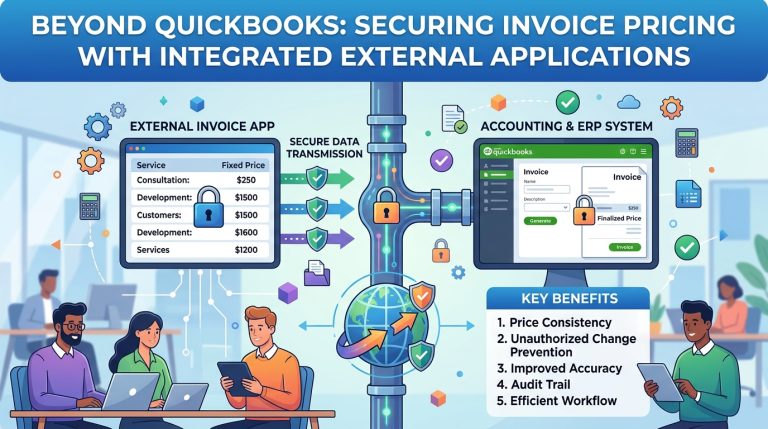
Beyond QuickBooks: Securing Invoice Pricing with Integrated External Applications

QuickBooks Desktop and QuickBooks Online have long served as the financial backbone for millions of small and mid-sized enterprises. Their strength lies in intuitive bookkeeping, robust reporting, and seamless tax compliance. However, when businesses scale, introduce complex pricing structures, or operate in regulated industries, a critical vulnerability emerges at the point of invoice creation: QuickBooks lacks native, field-level price controls.

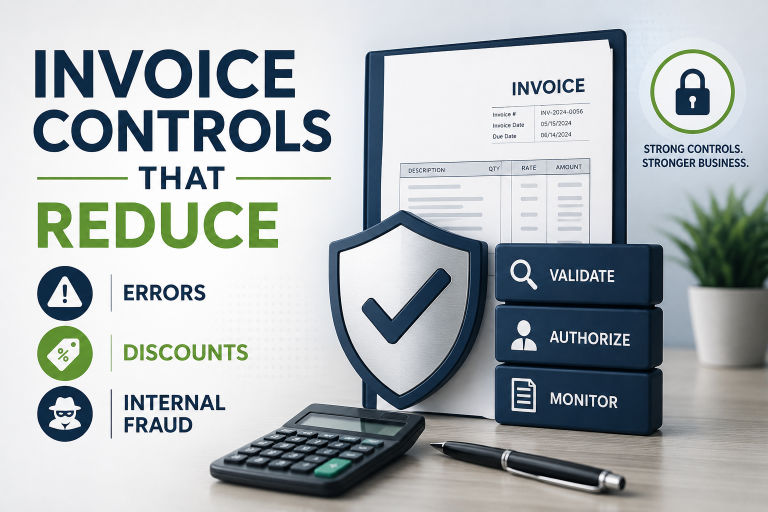
While the platform excels at recording financial transactions, it was never engineered to enforce pricing policies, restrict unauthorized discounts, or mandate approval workflows at the invoicing stage. This architectural gap leaves companies exposed to margin erosion, internal fraud, compliance failures, and operational friction. The solution is not to patch QuickBooks with fragile workarounds, but to strategically decouple invoicing control from the ledger by deploying an external, purpose-built invoicing application that syncs bidirectionally with QuickBooks.


The Inherent Weaknesses of QuickBooks Price Control

QuickBooks’ permission model is fundamentally coarse. Once a user is granted access to create or edit invoices, the system implicitly trusts them to modify any field on that transaction. This design creates several critical control weaknesses:

  1. No Field-Level Price Permissions: Administrators cannot restrict access to the unit price or rate field independently. Invoice access equals full price-editing rights.
  2. Absence of Tolerance Bands or Hard Locks: There is no native mechanism to enforce minimum advertised prices (MAP), fixed wholesale rates, or percentage-based discount limits at the line-item level.
  3. No Approval Workflows for Price Overrides: If a sales rep or clerk changes a price, QuickBooks does not trigger a manager approval queue, request justification, or log the override event separately from the final transaction amount.
  4. Reactive, Not Preventive, Audit Trails: QuickBooks logs the final invoice state but does not capture the act of changing a price, who made the change, when it occurred, or why. During audits, reconciling unauthorized discounts requires manual forensic analysis.
  5. Rigid Price Level Limitations: While QuickBooks supports price levels, they are static, difficult to enforce dynamically across customer groups, and can be overridden without restriction by any user with invoice access.
  6. Inability to Enforce Separation of Duties: Businesses requiring maker-checker controls cannot natively configure a workflow where one user drafts an invoice and another must approve pricing before posting.

These limitations are not oversights; they are architectural realities. QuickBooks was designed as a post-transaction ledger, not a real-time sales governance platform.


Why Internal Workarounds and External Scripts Fall Short

Many IT teams attempt to bridge this gap with custom automation: Python scripts polling via COM/QBXML, database triggers, or third-party middleware that monitors for price deviations. While conceptually sound, these approaches suffer from fatal operational flaws:

  • Reactive Correction: External scripts can only detect and revert violations after the invoice is saved. By then, the customer may have received a discounted quote, the transaction may have triggered downstream workflows, or the fraud may have already occurred.
  • COM/SDK Fragility: QuickBooks’ desktop API relies on single-threaded COM sessions that are highly susceptible to modal dialog blocks, session timeouts, and ticket parameter is invalid errors. A correction script that fails silently leaves violations unaddressed.
  • Audit Fragmentation: External logging systems operate outside QuickBooks’ native audit trail. Reconciling price changes across disparate systems increases compliance risk and auditor scrutiny.
  • Performance Degradation: Aggressive polling (e.g., every 1–2 seconds) to achieve near-real-time correction consumes system resources, triggers QuickBooks UI locks, and destabilizes multi-user environments.

Workarounds treat the symptom, not the disease. They add cost, complexity, and failure points without eliminating the underlying control gap.


The Strategic Solution: External Invoicing + QuickBooks Integration

The most robust, enterprise-grade approach is to shift invoice creation and pricing enforcement to an external application, while retaining QuickBooks as the system of record for accounting, tax, and financial reporting.

In this architecture, the external application acts as the controlled front-end for sales and billing. It enforces pricing policies, user permissions, and approval workflows at the point of entry. Once an invoice is finalized and compliant, it syncs automatically to QuickBooks as a read-only or controlled-write transaction. QuickBooks remains the ledger; the external app becomes the governance layer.


What a Linked External Application Can Do That QuickBooks Cannot

A purpose-built invoicing platform integrated with QuickBooks delivers capabilities that are architecturally impossible within QuickBooks itself:

Control RequirementQuickBooks Native CapabilityExternal Integrated Application
Field-Level Price Locks❌ Not supported✅ Hard-lock prices per item, customer, or contract
Discount Tolerance Bands❌ Not supported✅ Allow ±X% deviation; block or flag outside range
Manager Approval Workflows❌ Not supported✅ Route overrides to designated approvers before posting
Mandatory Justification Logging❌ Not supported✅ Require reason codes, comments, and digital signatures
Role-Based Pricing Access❌ Coarse module-level only✅ View-only, edit-within-limits, or full override roles
Real-Time Override Audit Trail❌ Logs final state only✅ Logs user, timestamp, old price, new price, and approval status
Franchise/MAP Compliance Enforcement❌ Manual policing required✅ System blocks non-compliant pricing at save
Sync Reliability❌ COM/session-dependent✅ API-driven, queue-based, retry-managed, cloud-native

Architecture & Data Flow: How It Works in Practice

A production-ready integration follows a clean, secure data flow:

  1. Master Data Sync: Items, customers, tax codes, and price lists sync from QuickBooks to the external app on a scheduled or real-time basis.
  2. Invoice Creation & Validation: Sales staff or billing clerks create invoices in the external app. The system validates every line against configured price rules, customer agreements, and tolerance thresholds.
  3. Approval Routing (If Triggered): If a price falls outside allowed parameters, the invoice routes to a manager dashboard for review, justification, and electronic approval.
  4. Finalization & Sync: Once compliant, the invoice is marked as finalized. The external app pushes the transaction to QuickBooks via secure API or middleware. QuickBooks records it as a standard invoice; no manual entry required.
  5. Payment & Reconciliation: Payments collected in QuickBooks or payment gateways sync back to the external app for customer account reconciliation and reporting.
  6. Audit & Compliance: All pricing decisions, overrides, and approvals are stored in the external app’s immutable audit log. QuickBooks receives only the finalized, compliant transaction.

This architecture eliminates COM session conflicts, modal dialog blocks, and reactive correction loops. Control happens before the data ever touches the ledger.


Business Impact: From Reactive Correction to Proactive Control

Deploying an external invoicing application linked to QuickBooks delivers measurable operational and financial benefits:

  • Margin Protection: Unauthorized discounts are blocked at creation, not corrected days later. Pricing integrity is enforced by design, not by hope.
  • Fraud Prevention: Internal collusion, commission manipulation, and AR skimming schemes are neutralized because price changes require system validation or managerial approval.
  • Audit Readiness: Regulators, franchisors, and external auditors receive complete, timestamped override logs with mandatory justifications. No more reconciling fragmented audit trails.
  • Operational Efficiency: Accounting teams stop chasing price discrepancies, manually adjusting invoices, or running forensic reports. Reconciliation time drops significantly.
  • Scalability & Flexibility: Pricing rules can be updated centrally, rolled out instantly across users, and tailored by region, product line, or customer tier without disrupting QuickBooks configurations.

Conclusion: Control the Source, Protect the Ledger

QuickBooks remains an excellent financial ledger, but it was never designed to govern sales transactions at the point of creation. Relying on its native permissions or fragile external scripts to enforce pricing policies is a strategic misalignment that exposes businesses to margin leakage, compliance risk, and internal fraud.

The modern solution is architectural: decouple invoicing control from the accounting ledger. By deploying an external, purpose-built invoicing application that enforces granular price rules, approval workflows, and audit logging at the source, businesses transform pricing from a vulnerability into a controlled, compliant, and auditable process. QuickBooks continues to serve as the system of record; the external application becomes the system of governance.

Don’t patch the ledger. Control the source. Evaluate your invoicing architecture today, and align your technology stack with your fiduciary responsibility.

About the Author
Nyasha Makore is a QuickBooks Applications Developer specializing in financial workflow automation, SDK integrations, and accounting system security. With deep expertise in QBXML architecture and third-party application development, he helps businesses bridge native platform limitations with robust, compliant automation solutions. For technical consultations or development inquiries, contact via WhatsApp: +263773167539.

The Hidden Fraud Risk in QuickBooks Desktop

Why Lack of User-Level Price Permissions Exposes Your Business to Internal Theft

In the world of accounting software selection, businesses often focus on features like invoicing speed, reporting capabilities, or cloud sync. Rarely do they scrutinize one of the most critical controls for financial integrity: user-level price permissions. Yet this single oversight is costing companies millions in margin erosion, compliance failures, and outright fraud. QuickBooks Desktop, despite its market dominance, has a fundamental weakness that leaves businesses vulnerable to internal bad actors: it cannot restrict price modifications at the user permission level. Sage Pastel Partner, by contrast, was built with granular price governance at its core. Here’s why this difference isn’t just a feature gap—it’s a security vulnerability that could be exploited by the very employees you trust.

The QuickBooks Blind Spot: Any User Can Change Any Price

QuickBooks Desktop’s user permission system is notoriously coarse. Administrators can restrict access to modules (e.g., “Can create invoices but not delete them”) or limit visibility to certain customers or accounts. However, there is no native permission setting that prevents a user from modifying the unit price or rate field on an invoice line item. Once a user has access to create or edit invoices, they can—intentionally or accidentally—change the price of any item to any value.

Consider the scenarios this enables:

  • A disgruntled employee offers a “friend” a 90% discount on a $10,000 order, costing the company $9,000 in lost revenue.
  • A sales staff member applies unauthorized “promotional pricing” to boost their commission metrics, eroding margins across hundreds of transactions.
  • An accounts receivable clerk reduces a customer’s outstanding balance by lowering invoice line prices, then pockets the difference when the customer pays the original amount.
  • A manager overrides pricing without approval workflows, creating inconsistent billing that triggers customer disputes and audit red flags.

In each case, QuickBooks Desktop logs the transaction but provides no native mechanism to prevent, flag, or require approval for the price change itself. The system trusts the user implicitly once they have invoice access. For businesses with separation-of-duties requirements, franchise pricing agreements, or regulated margin controls, this is not a minor inconvenience—it’s a material control weakness.

Why External Scripts and Workarounds Fail to Close the Gap

Many IT teams attempt to mitigate this risk with external automation: Python scripts that poll for price violations, COM-based correctors that revert unauthorized changes, or database triggers that flag suspicious transactions. While creative, these approaches suffer from three fatal flaws:

  1. Reactive, Not Preventive: External tools can only detect and correct violations after the invoice is saved. By then, the damage may already be done—the customer has received a discounted quote, the employee has logged a fraudulent commission, or the transaction has been exported to a downstream system.
  2. Architectural Fragility: As documented extensively in real-world deployments, QuickBooks’ COM interface is prone to session timeouts, modal dialog blocks, and “ticket invalid” errors. A correction script that fails silently due to a QuickBooks UI popup leaves the fraudulent transaction uncorrected and undetected.
  3. Audit Gaps: External logging systems are separate from QuickBooks’ native audit trail. During an internal or external audit, reconciling price changes across multiple systems creates complexity and increases the risk of oversight.

In short, workarounds add cost and complexity without eliminating the underlying vulnerability. The permission to change prices remains with the user; the script is just a bandage on a structural wound.

Sage Pastel Partner: Granular Price Permissions as a Fraud Deterrent

Sage Pastel Partner was designed for businesses that require strict financial controls. Its user permission system includes native, field-level restrictions for pricing. Administrators can configure roles with surgical precision:

  • Price View-Only: Users can see item prices but cannot modify them during invoice entry.
  • Price Range Limits: Users can adjust prices only within a defined tolerance (e.g., ±5% of list price). Changes outside this range require manager approval.
  • Customer-Specific Pricing: Users can only apply pre-approved price lists assigned to specific customers or customer groups.
  • Override Logging with Mandatory Reasons: When a user is granted temporary price-adjustment rights, every override is logged with user ID, timestamp, and a mandatory justification field. These logs are visible in real-time to supervisors and included in native audit reports.
  • Role-Based Approval Workflows: Price changes beyond predefined thresholds can be configured to require electronic approval from a designated manager before the invoice can be saved.

These controls operate at the application layer, meaning they are enforced before the transaction is committed to the database. There is no window for exploitation, no external script to fail, and no audit trail to reconcile. The control is native, immediate, and non-bypassable by design.

Real-World Fraud Scenarios: How the Permission Gap Enables Loss

To understand the stakes, consider these documented cases where QuickBooks’ permission limitations contributed to financial loss:

Case 1: The “Friendly Discount” Scheme
A retail franchise employee used QuickBooks Desktop to process customer orders. Because the system allowed any invoice user to modify line prices, the employee routinely applied 50–80% discounts to friends and family. The fraud went undetected for 18 months because QuickBooks logged the final invoice amount but not the fact that the price had been manually overridden. Loss: $217,000 in unrecovered revenue.

Case 2: Commission Manipulation
A sales representative at a distribution company discovered they could increase their commission by lowering invoice prices to accelerate customer payments (which triggered bonus thresholds). QuickBooks had no permission setting to restrict price edits, and no approval workflow for discounts. The scheme inflated commission payouts by 34% over two years before an external audit uncovered the pattern. Loss: $89,000 in overpaid commissions + reputational damage.

Case 3: The Accounts Receivable Skim
An AR clerk with invoice-editing access reduced customer balances by lowering line-item prices on paid invoices. When customers paid the original (higher) amounts, the clerk diverted the difference to a personal account. QuickBooks’ audit trail showed the final invoice amount but not the price-change event, delaying detection. Loss: $156,000 + regulatory fines for inadequate internal controls.

In each case, Sage Pastel Partner’s native price permissions would have prevented the fraud at the point of entry: the employee would have been blocked from changing the price, or the change would have triggered an approval workflow that exposed the anomaly.

Compliance and Audit Implications: Beyond Fraud Prevention

The risk isn’t limited to intentional fraud. Many industries face regulatory requirements for pricing transparency and margin controls:

  • Franchise Agreements: Franchisors often mandate minimum advertised prices (MAP) or fixed wholesale rates. QuickBooks cannot enforce these at the user level, exposing franchisors to breach-of-contract claims.
  • Healthcare and Government Contracting: Regulated sectors require auditable justification for any price deviation. QuickBooks’ lack of native override logging creates compliance gaps during inspections.
  • Public Company SOX Controls: Sarbanes-Oxley requires documented internal controls over financial reporting. A system that allows unrestricted price edits by any invoice user is a material weakness that auditors will flag.

Sage Pastel Partner addresses these requirements natively. Price permissions are configurable, override reasons are mandatory and logged, and all changes are visible in real-time audit reports. This isn’t just about preventing fraud—it’s about demonstrating due diligence to regulators, auditors, and business partners.

The Cost of “Good Enough”: Why Businesses Delay the Switch

Many companies recognize QuickBooks’ permission limitations but delay migration due to perceived switching costs: data conversion, staff retraining, workflow disruption. However, the hidden cost of inaction is often far greater:

  • Margin Erosion: Unauthorized discounts compound over time. A 5% leak on $1M in annual invoicing is $50,000 in lost profit.
  • Fraud Losses: As the cases above illustrate, internal theft enabled by weak controls can reach six figures before detection.
  • Audit Remediation: Fixing control weaknesses post-audit often requires emergency consulting, system customization, or rushed migrations—far more expensive than a planned transition.
  • Reputational Damage: Customer disputes over inconsistent pricing or regulatory fines for inadequate controls can harm brand trust long after the technical issue is resolved.

When evaluated against these risks, the investment in a platform with native price governance becomes not just a technical decision, but a financial safeguard.

Making the Transition: Practical Steps for Businesses Ready to Enforce Price Control

If your organization has identified price permissions as a critical control gap, here’s how to move forward:

  1. Document Your Pricing Policy: Define who can change prices, under what conditions, and what approvals are required. This becomes your configuration blueprint.
  2. Map QuickBooks Roles to Pastel Partner Permissions: Identify which QuickBooks user roles need view-only, limited-adjustment, or full pricing rights in the new system.
  3. Pilot with a Control Group: Test Sage Pastel Partner’s price permissions with a small team before full rollout. Validate that approval workflows, override logging, and audit reports meet your compliance needs.
  4. Train Staff on the “Why”: Emphasize that price controls protect the business, not just restrict users. Frame permissions as a tool for consistency and fairness.
  5. Migrate with Data Integrity: Use Sage’s migration tools or a certified partner to ensure item lists, customer price agreements, and historical transactions transfer accurately.

Conclusion: Price Control Isn’t a Feature—It’s a Fiduciary Duty

In an era of increasing regulatory scrutiny and sophisticated internal fraud, accounting software must do more than record transactions—it must enforce the policies that protect those transactions. QuickBooks Desktop’s inability to restrict price modifications at the user permission level isn’t just a missing feature; it’s a control weakness that exposes businesses to financial loss, compliance risk, and reputational harm.

Sage Pastel Partner was built for organizations that cannot afford to trust implicitly. Its native, granular price permissions ensure that pricing policies are enforced at the point of entry, logged transparently, and auditable in real time. For businesses where every dollar of margin matters, where compliance is non-negotiable, and where internal controls must be demonstrably robust, the choice isn’t about which software is more popular—it’s about which platform aligns with your fiduciary responsibility.

Don’t wait for a fraud incident to reveal the gap. Evaluate your pricing controls today. Your financial integrity depends on it.

Beyond the Hype: The Strategic First Steps in AI Automation for Small Business (A 2026 Reality Check)

Beyond the Hype: The Strategic First Steps in AI Automation for Small Business (A 2026 Reality Check)

Forget the buzzwords. Forget the “AI will solve everything” promises peddled by vendors desperate for your subscription. If you’re a small business owner staring at a mountain of daily tasks, drowning in admin, and wondering where to even begin with AI, you’re not alone. The current landscape (May 2026) is a confusing mix of genuine potential and overblown claims. Automating the wrong thing first isn’t just a waste of money; it erodes trust in the technology itself and steals precious time you can’t afford to lose.

The critical question isn’t what AI can do, but what should you automate first to generate immediate, tangible value while building a foundation for sustainable growth? This isn’t about chasing shiny objects; it’s about surgical precision. Based on real-world struggles and successes across diverse small businesses globally, here’s your deep, practical, and brutally honest guide.

The Core Principle: Automate the “Drudgery Drain,” Not the “Heartbeat”

Before we dive into tools, internalize this: AI’s greatest value for small businesses right now is eliminating the repetitive, rule-based tasks that drain human energy and creativity – the “Drudgery Drain.” These are the tasks that:

  1. Consume disproportionate time relative to their value (e.g., 3 hours spent manually categorizing expenses).
  2. Are highly predictable and rule-based (e.g., scheduling social media posts, basic data entry).
  3. Cause consistent errors or frustration due to human fatigue (e.g., transposing numbers in invoices).
  4. Generate zero customer delight or strategic insight on their own.

DO NOT START HERE (Common Pitfalls in 2026):

  • Replacing Your Frontline Customer Service with a Generic Chatbot: Unless you have extremely simple, FAQ-only interactions (and even then…), a poorly implemented chatbot is a customer experience disaster. It frustrates users, increases ticket volume when it fails, and damages your brand. (See: The Berlin Bäckerei that lost 15% of its regulars after a chatbot couldn’t handle “Can I substitute rye flour in the sourdough?” – a core local request).
  • Automating Complex Creative Work Prematurely: Trying to use AI to write your entire unique brand voice or design bespoke products often results in soulless, generic output. AI is a collaborator, not a replacement, for human creativity at this stage. (See: The Oaxacan artisanal chocolate maker whose AI-generated “story” for new flavors confused customers – they missed the human touch of the founder’s handwritten notes).
  • Chasing “Predictive Analytics” Before Fixing Data Hygiene: Fancy sales forecasting is useless if your CRM data is a mess of inconsistent entries and missing fields. Garbage in, gospel out (but wrong). Fix your data first; then layer on AI.

The Strategic First Automations: Your 2026 Priority List

Based on global case studies and measurable ROI for small teams (1-20 people), here’s where to focus your initial AI efforts for maximum impact with minimal risk:

1. Taming the Time Vampire: Administrative & Operational Overhead

  • The Problem: Invoicing, expense tracking, scheduling, basic bookkeeping. This is the silent killer of small business productivity. A Nairobi-based florist (Petals & Thorns) spent 12+ hours weekly just matching delivery notes to invoices and chasing payments.
  • The 2026 Solution & Practical Guide:
    • Tool Focus: AI-Powered Accounting Assistants (e.g., QuickBooks Advanced w/ AI Copilot, Xero w/ Hubdoc AI, Zeni.ai). Avoid basic automation; look for context-aware AI.
    • What to Automate FIRST:
      • Receipt & Invoice Data Extraction: Stop manual entry. Point your phone camera; AI reads vendor, date, amount, category with high accuracy, even for messy receipts. Crucially: Set up clear category rules first. Train the AI on your specific expense types (e.g., “Floral Wire – Supplier A” vs. “Floral Wire – Supplier B”).
      • Automated Expense Categorization & Policy Checks: AI flags expenses that might violate policy (e.g., a $200 “dinner” on a Sunday) based on your rules, not just generic categories. Human reviews only the flags.
      • Smart Invoice Matching & Payment Reminders: AI matches POs to invoices and delivery notes automatically. It sends personalized, non-annoying payment reminders (“Hi Sarah, your invoice #123 for the Mother’s Day bouquet is due tomorrow. Pay now? [Link]”) based on payment history and relationship.
    • Nairobi Florist Case Study: Petals & Thorns implemented Zeni.ai. They spent 2 days defining categories and rules. Result: Saved 9 hours/week on admin. The owner redirected that time to calling top clients personally to discuss new seasonal arrangements, leading to a 22% increase in repeat orders within 3 months. The AI didn’t replace the relationship; it freed the human to nurture it.
    • Your Action Plan:
      1. Track: Log exactly how many hours/week you spend on manual data entry, categorization, and chasing payments for one week.
      2. Audit: Identify the top 2-3 most time-consuming, error-prone admin tasks.
      3. Choose: Select a tool specializing in your specific pain point (e.g., expense mgmt vs. invoicing). Prioritize tools with strong mobile capture and customizable rules engines. Free trials are non-negotiable.
      4. Implement Ruthlessly: Dedicate 4-8 hours upfront to configure rules and train the AI on your data patterns. This is the make-or-break step.
      5. Measure: Track time saved and error reduction weekly for the first month. Did it hit your target (e.g., 5+ hours saved)?

2. Supercharging (Not Replacing) Customer Communication: The “First Touch” Filter

  • The Problem: Overwhelming email/social DMs for simple queries (hours, location, basic product specs), clogging channels for real issues. A boutique fitness studio in Melbourne (Flow Studio) was missing genuine client concerns because their inbox was flooded with “What time is the 7am class?” messages.
  • The 2026 Solution & Practical Guide:
    • Tool Focus: AI-Powered Triage & Response Assistants (e.g., ManyChat Pro w/ GPT-4o integration, Zendesk Answer Bot (configured for specific FAQs), Custom GPTs for email). Key: This is NOT a full chatbot replacement; it’s an intelligent filter and draft generator.
    • What to Automate FIRST:
      • Intelligent Email Triage & Drafting: AI scans incoming emails, accurately identifies simple requests (booking confirmation, location query, basic FAQ), and generates a draft response for the human to review and send with one click. For complex or emotional emails, it flags them immediately for human attention with context.
      • Hyper-Specific Social Media FAQ Handling: ONLY automate responses to pre-defined, crystal-clear questions on one platform (e.g., Instagram DMs: “What are your hours?” -> “We’re open Mon-Fri 6am-8pm, Sat 7am-2pm. Closed Sundays! 🧘‍♀️”). Crucially: Include a clear, easy escape hatch: “Type ‘agent’ anytime to talk to a real human.”
    • Melbourne Studio Case Study: Flow Studio used ManyChat configured only for Instagram DMs with 5 specific, unambiguous FAQs (hours, class schedule link, pricing link, how to book, location map link). They did not automate rescheduling or complaints. Result: Reduced simple DM volume by 65%, freeing staff to proactively check in with clients who had recently attended classes (a human touchpoint that boosted retention). Crucially, the “Type ‘agent'” option was used 12% of the time, ensuring no one felt trapped.
    • Your Action Plan:
      1. Analyze: Categorize all customer inquiries for a week. What percentage are truly simple, factual, repetitive questions? (Aim for >40% to justify this step).
      2. Define Rigorously: List exactly which 3-5 questions you will automate. Be painfully specific. “What are your hours?” is good. “Can I get a discount?” is not (too variable).
      3. Choose & Configure Sparingly: Pick one channel (email or one social platform). Configure the AI only for your defined FAQs. Write the responses yourself first; let the AI mimic your voice.
      4. Implement the Human Handoff: Make the path to a real person obvious and frictionless. Test it relentlessly.
      5. Monitor & Iterate: Check daily: Is the AI answering correctly? Are people using the handoff? Tweak responses constantly. If accuracy drops below 95%, pause and fix the rules.

3. Optimizing the Predictable: Inventory & Basic Demand Forecasting

  • The Problem: Wasted capital on dead stock, lost sales from stockouts, constant manual counting. A family-run cheese shop in Lyon (Fromagerie Dubois) struggled with seasonal fluctuations – selling out of Comté in winter, wasting fresh chèvre in summer.
  • The 2026 Solution & Practical Guide:
    • Tool Focus: AI within Inventory/Sales Platforms (e.g., Lightspeed Retail w/ Demand Forecasting, Shopify’s Inventory AI tools, Cin7 Core). Avoid standalone “AI forecasting” black boxes; it needs to live in your operational system.
    • What to Automate FIRST:
      • Replenishment Alerts Based on Your Data: AI analyzes your sales history (factoring in seasonality, local events, even weather if integrated), current stock levels, and lead times to generate specific, actionable reorder points (“Order 15 wheels of Comté NOW for delivery in 10 days”). Not vague predictions.
      • Dead Stock Identification: AI flags slow-moving items based on your sales velocity and category norms, suggesting targeted promotions before they become write-offs.
    • Lyon Cheese Shop Case Study: Fromagerie Dubois used Lightspeed Retail’s forecasting module. They fed it 18 months of sales data, noting major local festivals. The AI learned that sales of certain goat cheeses spiked 3 weeks before the annual Fête des Lumières. Result: Reduced stockouts by 35% during peak season and cut dead stock write-offs by 28% by proactively discounting items identified as slow-movers before spoilage. The owner still makes the final order decision, but the AI provides the crucial data-driven nudge.
    • Your Action Plan:
      1. Data Cleanliness Check: Is your sales data reasonably accurate and consistent? (This is often the biggest hurdle). Fix major gaps first.
      2. Start Small: Pick one product category (e.g., your bestsellers) or one location if multi-store.
      3. Configure Cautiously: Set conservative reorder points initially. Let the AI run in “advisory mode” for 1-2 months – it suggests, you decide. Track its suggestions vs. your actual decisions and outcomes.
      4. Incorporate Human Context: Manually add notes for known events (e.g., “Local marathon – expect +20% demand for energy bars”). Teach the AI your local reality.
      5. Measure Impact: Track stockout frequency, inventory turnover ratio, and dead stock costs monthly. Did the AI help improve these?

The Non-Negotiables for Success in 2026 (Beyond the Tool)

  • Human-in-the-Loop is Mandatory: AI is an intern, not a manager. Always have a human reviewing, approving, and taking responsibility for AI outputs, especially in customer-facing or financial areas. Build this into your workflow from day one.
  • Data is Your Foundation, Not an Afterthought: Garbage data = garbage AI. Spend time upfront ensuring the data feeding the AI is as clean and consistent as reasonably possible for your business size. One hour of data cleaning saves ten hours of AI debugging.
  • Start Microscopically: Automate one specific task within one process. Don’t try to boil the ocean. Prove value on a small scale before expanding.
  • Measure What Matters (to YOU): Don’t just track “AI usage.” Track time saved, errors reduced, revenue protected (from stockouts), costs avoided (dead stock), or customer satisfaction on the specific task you automated. Did it free up time for more valuable human work?
  • Ethics & Transparency: Be upfront with customers when they’re interacting with AI (e.g., “Hi, I’m an assistant helping Sarah! For complex requests, I’ll connect you with her directly.”). Respect privacy – know where your data goes.

The Real Goal: Augmentation, Not Just Automation

The most successful small businesses in 2026 aren’t the ones with the most AI tools; they’re the ones using AI strategically to augment their human strengths. The Nairobi florist uses saved admin time for personalized client calls. The Melbourne studio uses reduced DM load for proactive client check-ins. The Lyon cheesemonger uses better inventory data to curate more thoughtfully.

Your First Step Tomorrow:

  1. Grab your calendar for last week.
  2. Circle every block of time spent on purely repetitive, rule-based tasks (data entry, simple scheduling, basic email replies, manual counting).
  3. Add up the hours. Be honest.
  4. Pick the single task that consumed the most hours AND meets the “Drudgery Drain” criteria (predictable, error-prone, zero strategic value).
  5. Research one tool specifically for that task. Look for free trials and real small business reviews (not just vendor hype).

Stop trying to build an AI empire. Start by eliminating one persistent, soul-sucking chore. Free up those 3 hours. Use them to talk to a customer, refine your product, or simply breathe. That’s the transformative power of AI for small business in 2026: not replacing you, but finally giving you the space to be the human entrepreneur your business needs. The technology is ready. Are you ready to automate the drain, and amplify the human? The time for thoughtful, strategic starts is now.

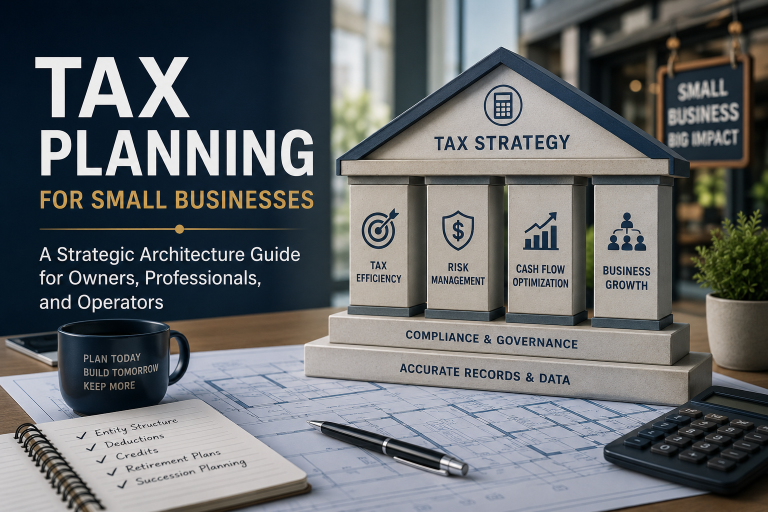
Tax Planning for Small Businesses: A Strategic Architecture Guide for Owners, Professionals, and Operators

Year-end is rarely just a calendar boundary. For small businesses, it is a strategic inflection point where operational reality, financial architecture, and tax liability converge. Too often, owners treat the final quarter as a compliance sprint: reconcile accounts, hand documents to an accountant, and file. This reactive posture leaves millions in deferred tax optimization, missed credits, and unmitigated audit risk on the table.

Modern tax planning is not about aggressive minimization. It is about tax-aware operational architecture—designing records, timing, and structures so that compliance becomes a byproduct of strategic clarity. The foundation of that architecture is record review. What you choose to examine, how you classify it, and when you act on it before December 31 (or your fiscal year-end) determines whether taxes are a cost center or a controlled variable.

This guide dissects the records small businesses must review before year-end, translates them into actionable strategies, and grounds them in real-world scenarios across jurisdictions. It is built for founders, operators, and tax professionals who want to move from retrospective filing to prospective design.


Part I: The Philosophical Shift—From Filing to Architecture

Tax strategy begins long before the return is prepared. It begins when an invoice is issued, a contract is signed, a worker is classified, or an asset is purchased. In 2026, the global compliance landscape has shifted toward real-time reporting, digital transaction visibility, and cross-border transparency (OECD BEPS 2.0, e-invoicing mandates, economic nexus thresholds). In this environment, data hygiene is tax strategy.

A well-kept ledger does more than satisfy authorities. It:

  • Reveals timing arbitrage opportunities (defer income, accelerate deductions)
  • Surfaces eligibility for credits, allowances, and zone-based incentives
  • Exposes structural inefficiencies (entity misalignment, contractor misclassification, lease accounting mismatches)
  • Creates audit resilience through documentation trails

The year-end record review is not an administrative chore. It is a strategic audit of your business’s tax posture.


Part II: The Core Ledger Audit—8 Record Categories to Review

1. Revenue & Receivables: Timing is Taxable Income

What to review: Unbilled revenue, deferred income, bad debt reserves, subscription vs. project-based recognition, customer prepayments.
Why it matters: Revenue recognition timing directly impacts taxable income, VAT/GST liability, and cash flow. Misaligned recognition can trigger phantom tax liabilities or missed deferral windows.
Strategic action:

  • Under cash accounting, consider delaying invoicing for completed work until after year-end if cash flow permits.
  • Under accrual accounting, evaluate whether contract milestones can be structured to align with tax periods.
  • Establish or adjust bad debt reserves where collectibility is doubtful (jurisdiction-dependent).
  • For subscription models, review annual prepayments vs. monthly billing to manage VAT/GST point-of-taxation rules.

Scenario: A UK-based SaaS firm notices 60% of clients opt for annual upfront payments. By shifting renewal communications to January and offering a 3% discount for quarterly billing starting Q1, the company defers £180k of revenue recognition, smoothing VAT remittances and reducing Q4 taxable profit without sacrificing cash flow.


2. Operating Expenses & Prepayments: The Acceleration Lever

What to review: Recurring expenses, prepaid services, professional fees, marketing spend, R&D, travel, home office allocations, vehicle logs.
Why it matters: Deductible expenses reduce taxable income, but their timing and classification dictate whether you capture immediate relief or spread benefits over years.
Strategic action:

  • Accelerate deductible expenses before year-end (software licenses, insurance, maintenance, consulting retainers).
  • Prepay eligible services where allowed (subject to 12-month rule equivalents).
  • Separate capital expenditures from repairs/maintenance to avoid disallowed depreciation claims.
  • Document R&D activities rigorously; many jurisdictions offer refundable credits or enhanced deductions.

Scenario: A Canadian artisanal bakery purchases a $45k commercial oven in November. By timing delivery and installation before year-end, the owner claims an accelerated capital allowance under the enhanced depreciation regime, reducing taxable income by ~$22k in Year 1 while preserving cash flow through financing.


3. Payroll, Contractors & Workforce Architecture

What to review: Employee vs. contractor classifications, bonus timing, pension/retirement contributions, fringe benefits, gig/platform payments, international remote workers.
Why it matters: Misclassification triggers penalties, back taxes, and benefit liabilities. Payroll timing and retirement contributions are among the most reliable deduction levers.
Strategic action:

  • Audit contractor agreements against local control tests (UK IR35 equivalents, Australia’s contractor guidelines, EU platform worker directives).
  • Shift discretionary bonuses to January if cash flow or profit targets are uncertain.
  • Maximize employer retirement/pension contributions before year-end (often deductible at higher rates than individual contributions).
  • Track remote worker locations to avoid unintentional payroll nexus or permanent establishment risk.

Scenario: An Australian digital agency engages three overseas freelancers. A year-end audit reveals two meet employee criteria under local guidelines. The firm restructures contracts, registers for compliant payroll withholding, and captures deductible superannuation contributions while avoiding future compliance penalties.


4. Inventory & Cost of Goods Sold (COGS): Valuation as Strategy

What to review: Stock levels, obsolescence, shrinkage, valuation method (FIFO, weighted average, specific identification), write-downs, consignment inventory.
Why it matters: Overstated inventory inflates profit and taxes; understated inventory triggers audit flags. Proper valuation and write-downs align tax liability with economic reality.
Strategic action:

  • Conduct a physical count and reconcile with ledger.
  • Write down obsolete, damaged, or slow-moving inventory before year-end (document with photos, aging reports, market data).
  • Review valuation method consistency; switching methods often requires authority approval.
  • For manufacturers, track work-in-progress to avoid premature expense recognition.

Scenario: A German electronics distributor identifies €90k of legacy components rendered obsolete by new EU energy efficiency standards. A documented write-down reduces taxable profit, frees up balance sheet space, and aligns tax reporting with actual market value.


5. Capital Assets & Depreciation Schedules

What to review: Asset registers, acquisition dates, depreciation methods, bonus depreciation availability, disposed/sold assets, like-kind exchanges (where applicable), green/tech transition assets.
Why it matters: Capital assets offer multi-year tax relief, but timing, classification, and disposition planning determine whether you capture accelerated relief or trigger recapture taxes.
Strategic action:

  • Align purchases with year-end to claim current-year allowances or bonus depreciation.
  • Review asset disposals: losses may offset gains; recapture rules vary by jurisdiction.
  • Track green energy, EV, or efficiency assets for jurisdiction-specific credits.
  • Maintain detailed registers (cost, date, method, accumulated depreciation) to prevent schedule drift.

Scenario: A US solar installer purchases mounting equipment in December, timing delivery to qualify for accelerated depreciation and a federal clean energy investment credit. The combined effect reduces Year 1 tax liability by 34%, while improving project ROI.


6. Debt, Financing & Interest Deductibility

What to review: Loan agreements, interest expense, related-party loans, debt-to-equity ratios, earnings stripping limits, lease vs. loan classification.
Why it matters: Interest is often deductible, but many jurisdictions cap deductions based on EBITDA, equity ratios, or related-party rules. Poor documentation triggers disallowances.
Strategic action:

  • Review loan terms for arm’s-length interest rates and proper documentation.
  • Monitor thin capitalization or earnings stripping thresholds; restructure if approaching limits.
  • Consider refinancing high-interest debt before year-end if deductible interest relief is capped.
  • Separate capital lease obligations from operating leases for accurate deduction treatment.

Scenario: A Singapore-based startup relies on shareholder loans at 9% interest. A year-end review reveals the rate exceeds arm’s-length benchmarks and triggers thin capitalization scrutiny. The firm restructures with a third-party facility at market rate, preserving deductibility and audit resilience.


7. Contracts, Leases & Entity Structures

What to review: Service agreements, revenue-sharing contracts, lease terms (ASC 606/IFRS 15 equivalents), mid-year entity changes, intercompany agreements, royalty/licensing fees.
Why it matters: Contracts dictate revenue recognition, expense timing, and cross-border tax treatment. Mid-year structural changes without documentation create misaligned tax periods and transfer pricing exposure.
Strategic action:

  • Align invoicing schedules with tax periods where feasible.
  • Document intercompany transactions at arm’s length; prepare contemporaneous transfer pricing notes.
  • Review lease classifications for accurate deduction vs. capitalization treatment.
  • If entity structure changed mid-year, ensure income/expenses are allocated correctly across periods.

Scenario: An Indian IT services firm signs a multi-year contract with milestone-based payments. A year-end contract review reveals three milestones fall in December, but deliverables won’t be completed until January. The firm renegotiates billing terms to January, deferring revenue recognition and smoothing tax liability.


8. Compliance, Digital Footprint & Cross-Border Nexus

What to review: VAT/GST registration thresholds, digital service taxes, economic nexus triggers, e-invoicing compliance, data retention policies, audit trails.
Why it matters: Digital commerce and remote work have dissolved traditional physical presence tests. Nexus is now driven by revenue, customers, and digital activity. Non-compliance triggers penalties that dwarf tax savings.
Strategic action:

  • Map customer locations against economic nexus thresholds.
  • Verify VAT/GST registration status in jurisdictions where thresholds are crossed.
  • Ensure e-invoicing, digital reporting, or real-time transaction systems meet local mandates.
  • Maintain audit-ready documentation for cross-border transactions, digital services, and platform sales.

Scenario: A micro-multinational EU SaaS provider hits €100k in digital sales across three member states. A year-end compliance review triggers OSS (One-Stop Shop) VAT registration, streamlining remittances and avoiding retroactive penalties while preserving growth momentum.


Part III: Strategic Timing Levers—When to Move, When to Pause

Record review reveals opportunities; timing captures them. Small businesses must balance cash flow, operational reality, and tax optimization. The following decision matrix guides strategic timing:

ObjectiveMechanismBest ForRisk/Caveat
Defer Taxable IncomeDelay invoicing, push deliverables to January, accelerate expense prepaymentsCash-rich businesses, volatile profit yearsCustomer relations, contract terms, cash flow needs
Accelerate DeductionsPrepay eligible expenses, purchase assets, maximize retirement contributionsHigh-profit years, credit-eligible businessesLiquidity constraints, 12-month rule limits
Capture CreditsR&D, green tech, hiring incentives, zone-based programsInnovation, sustainability, growth-phase firmsDocumentation intensity, compliance timelines
Harvest LossesWrite down inventory, dispose of underperforming assets, realize capital lossesAsset-heavy, transitioning businessesRecapture rules, market impact, audit scrutiny

Rule of thumb: Optimize timing only when it aligns with operational reality. Tax strategy should never force a business to make economically irrational decisions solely for tax relief.


Part IV: The Modern Tax Stack—Tools, Automation & Professional Collaboration

In 2026, year-end record review is no longer a spreadsheet exercise. It is a continuous data workflow supported by a modern tax stack:

  • Cloud Accounting + AI Reconciliation: Platforms like Xero, QuickBooks, Zoho, and Sage now offer automated receipt matching, rule-based categorization, and real-time tax liability forecasting.
  • Continuous Close vs. Year-End Crunch: Monthly reconciliation, rolling forecasts, and quarterly tax posture reviews eliminate December panic.
  • Audit Trail Architecture: Digital documentation, timestamped approvals, and version-controlled contracts create defensible records.
  • Professional Collaboration Model:
  • Founder/Owner: Sets strategy, approves timing, ensures data completeness
  • Bookkeeper/Controller: Maintains hygiene, flags anomalies, runs reports
  • CPA/EA/Tax Advisor: Structures optimization, ensures compliance, models scenarios
  • Tax Attorney (if applicable): Addresses cross-border, entity, or litigation risks

Data is the new balance sheet. Clean, continuous records turn tax planning from a retrospective exercise into a forward-looking strategy.


Part V: Common Pitfalls & Red Flags

  1. Mixing Personal & Business Expenses: Blurred lines trigger disallowances and audit flags. Use dedicated accounts, clear allocation policies, and documented home office/vehicle logs.
  2. Ignoring Nexus & Digital Thresholds: Remote sales and platform revenue trigger registration requirements long before owners realize it.
  3. Over-Optimizing Timing: Deferring income while delaying vendor payments can strain supplier relationships and damage creditworthiness.
  4. Poor Contractor Documentation: Missing W-8/W-9 equivalents, lack of control tests, and inconsistent payment patterns invite classification audits.
  5. Neglecting Asset Registers: Depreciation schedule drift leads to over/under-deductions and recapture surprises upon disposition.
  6. Reactive vs. Proactive Mindset: Waiting until November to review records leaves no time for strategic timing, credit capture, or structural adjustments.

Part VI: Conclusion—Year-End as a Strategic Ritual

Tax planning for small businesses is not about loopholes. It is about clarity, timing, and documentation. The records you review before year-end are not just compliance artifacts; they are the operational mirror of your business. They reveal where cash is trapped, where deductions are leaking, where credits are waiting, and where structural misalignments are silently inflating liability.

Owners who treat year-end as a strategic ritual—reviewing records, timing decisions, and aligning operations with tax architecture—do not just file returns. They design resilience, preserve cash, and fund growth. Professionals who guide them do not just prepare numbers. They translate data into strategy.

The goal is not to pay zero tax. It is to pay the right tax, at the right time, with full compliance, documented intent, and operational alignment. In an era of real-time reporting, digital transparency, and global compliance convergence, that is the only sustainable advantage.


Appendix: 90-Day Year-End Tax Record Review Checklist

90 Days Out

  • [ ] Reconcile all bank, credit, and payment platform accounts
  • [ ] Run profit & loss by month; identify profit spikes/dips
  • [ ] Review asset register; flag pending purchases/disposals
  • [ ] Audit contractor/employee classifications
  • [ ] Map customer locations against nexus/VAT thresholds

60 Days Out

  • [ ] Inventory count; document obsolescence/write-downs
  • [ ] Review depreciation schedules; align with acquisition dates
  • [ ] Evaluate prepayment opportunities (software, insurance, retainers)
  • [ ] Maximize retirement/pension contributions
  • [ ] Draft intercompany/transfer pricing documentation (if applicable)

30 Days Out

  • [ ] Run tax liability forecast; model deferral/acceleration scenarios
  • [ ] Review loan agreements; verify interest deductibility limits
  • [ ] Confirm e-invoicing/digital reporting compliance
  • [ ] Identify credit eligibility (R&D, green, hiring, zones)
  • [ ] Schedule professional review with CPA/tax advisor

7 Days Out

  • [ ] Finalize revenue recognition adjustments
  • [ ] Execute timing decisions (delay invoices, accelerate expenses)
  • [ ] Compile audit-ready documentation (contracts, logs, approvals)
  • [ ] Lock ledger; prevent post-year-end retroactive changes
  • [ ] Confirm filing deadlines, extension options, payment schedules

Note: Tax rules vary by jurisdiction and change frequently. This guide outlines strategic principles and decision frameworks. Always consult licensed tax professionals and verify local regulations before executing timing or structural decisions.

Invoice Controls That Reduce Errors, Discounts, and Internal Fraud

A Strategic Operating Guide for Business Owners, Finance Leaders, and Professionals

Invoicing is rarely treated as a strategic function. Yet, it sits at the exact intersection of cash flow, vendor relationships, regulatory compliance, and operational discipline. When left unguarded, the accounts payable (AP) pipeline becomes a quiet drain: duplicate payments slip through, contractual discounts evaporate, tax mismatches trigger penalties, and internal fraud hides behind routine transactions.

Industry benchmarks consistently show that organizations without structured invoice controls lose 1–3% of annual procurement spend to errors and leakage. In mid-market and high-velocity environments, that figure can quietly approach 5%. More importantly, the cost isn’t just financial. Uncontrolled invoicing erodes audit readiness, damages vendor trust, and distracts leadership from growth initiatives.

This guide distills a layered, globally tested control architecture into actionable steps. It is written for owners who need clarity, finance professionals who need structure, and operators who need execution pathways.


Part I: The Triad of Invoice Vulnerabilities

Before designing controls, you must understand what they are defending against. Errors, discount leakage, and internal fraud rarely occur in isolation. They share common root causes: fragmented workflows, weak segregation of duties, poor master data governance, and a culture that treats AP as administrative rather than strategic.

1. Errors: The Silent Multiplier

  • Data entry & OCR misreads: Typos in amounts, dates, or tax codes cascade into reconciliation failures.
  • PO mismatches: Goods/services received differ from what was invoiced, but approvals proceed on autopilot.
  • Tax & compliance drift: VAT/GST/Sales Tax rates change; invoices apply outdated or incorrect jurisdictional rules.
  • Duplicate submissions: Vendors resubmit invoices after payment delays; systems fail to flag them.

Errors compound. A single misapplied tax rate across 500 invoices can trigger regulatory scrutiny. Duplicate payments rarely surface until quarter-end reconciliations, by which time cash has already left the building.

2. Discount Leakage: The Hidden Margin Tax

  • Unauthorized early payments: Staff pay invoices early to clear queues, triggering discounts that weren’t budgeted or approved.
  • Phantom discount adjustments: Vendors or employees manually apply post-invoice credits that bypass procurement contracts.
  • Failure to capture contractual terms: Volume rebates, prompt payment incentives, and tiered pricing sit in PDFs or emails, never digitized into payable rules.
  • Collusion pricing: Buyers negotiate off-book discounts with suppliers, then invoice at standard rates, pocketing the difference through personal accounts or side agreements.

Discount leakage is often mistaken for “process friction.” In reality, it’s a structural failure to digitize, enforce, and monitor commercial terms.

3. Internal Fraud: The Control Override

  • Shell vendor creation: Employees register fictitious companies with addresses matching their own or a relative’s.
  • Duplicate payment schemes: Real invoices are paid, then slightly altered versions are resubmitted under different reference numbers.
  • Inflation & quantity padding: Units, rates, or hours are inflated on service invoices where physical delivery is hard to verify.
  • Approval bypass & threshold splitting: Staff fragment invoices to stay below authorization limits or exploit managers who rubber-stamp approvals.

Fraud thrives where visibility ends. The absence of vendor master data controls, lack of independent payment release, and missing audit trails create fertile ground for exploitation.


Part II: The Four-Tier Invoice Control Architecture

Effective controls are not bureaucratic checkpoints. They are precision filters that separate legitimate transactions from anomalies while preserving operational velocity. The architecture operates across four tiers:

Tier 1: Pre-Invoice Controls (Prevention)

Controls applied before an invoice enters your system.

  • Vendor Onboarding & Verification: Tax ID validation, bank account verification via micro-deposits or API, sanctions screening, and beneficial ownership disclosure.
  • Contract Digitization: Extract payment terms, discount windows, pricing tiers, and penalty clauses into structured data fields.
  • Purchase Order Discipline: Mandate PO coverage for all non-payroll spend. Enforce “no PO, no pay” with documented exceptions routed to procurement.

Tier 2: Receipt & Validation Controls (Authentication)

Controls applied at invoice capture.

  • Three-Way Matching: PO ↔ Goods Receipt/Service Acknowledgment ↔ Invoice. Tolerances defined by materiality (e.g., ±0.5% value, ±2 units).
  • Automated Duplicate Detection: Fuzzy matching on vendor name, amount, date, and reference numbers. Flags near-duplicates and altered submissions.
  • Tax & Compliance Engines: Real-time validation against jurisdictional rates, reverse-charge rules, and e-invoicing mandates (e.g., EU PEPPOL, Latin America CFDI, India GSTN).

Tier 3: Approval & Authorization Controls (Routing)

Controls governing human decision points.

  • Segregation of Duties (SoD): The person who creates/edits vendors cannot approve invoices. The person who approves invoices cannot release payments.
  • Tiered Approval Matrices: Dynamic thresholds based on vendor risk, spend category, and historical accuracy. Exceptions route to cross-functional review.
  • Discount Authorization Rules: Early payment discounts require explicit procurement/finance sign-off. System auto-calculates ROI of taking vs. skipping discounts based on cost of capital.

Tier 4: Post-Payment & Reconciliation Controls (Detection)

Controls that close the loop.

  • Vendor Statement Reconciliation: Monthly automated matching of your payment ledger to vendor statements. Flags missing credits, unapplied discounts, and timing mismatches.
  • Payment Run Audits: Pre-execution review of payment files against approved invoices. Random sampling of high-value or first-time payments.
  • Continuous Controls Monitoring (CCM): AI-driven anomaly scoring on payment patterns, weekend approvals, round-dollar invoices, and sudden vendor address/bank changes.

Part III: Practical Implementation Roadmap (30-60-90 Days)

Owners and finance leaders need a phased approach that balances rigor with speed. Below is a scalable execution path.

Days 1–30: Diagnose & Baseline

  1. Map the current AP workflow. Identify every handoff, system, and approval step.
  2. Quantify historical leakage. Run a 12-month extract: duplicates, discount capture rate, error correction costs, fraud/exception tickets.
  3. Clean vendor master data. Remove inactive vendors, verify bank details, flag missing tax IDs, and consolidate duplicates.
  4. Draft a control policy document. Define SoD, approval thresholds, discount rules, exception handling, and vendor change protocols.

Days 31–60: Design & Automate

  1. Implement three-way matching with tolerance bands. Start with high-spend categories; expand gradually.
  2. Deploy OCR + AI validation. Ensure system flags mismatched amounts, missing POs, and tax anomalies before routing.
  3. Configure approval matrices. Align with your cost of capital for discount decisions. Route exceptions to a control committee (Finance + Procurement + Internal Audit).
  4. Establish a whistleblower & vendor dispute channel. Anonymous reporting reduces retaliation fear; vendor portals reduce email-based invoice manipulation.

Days 61–90: Operate & Institutionalize

  1. Run parallel processing. Keep legacy workflow for 2–4 weeks while new controls run in shadow mode. Compare outcomes.
  2. Train & assign accountability. AP clerks own data capture. Procurement owns contract terms. Finance owns approval routing. Audit owns monitoring.
  3. Launch monthly control reviews. Track KPIs, review exceptions, adjust tolerance bands, and retire obsolete rules.
  4. Document & audit. Prepare control narratives for external auditors. Map each control to risk type (error, discount, fraud) for clarity.

Note on Scaling: SMEs should prioritize vendor verification, duplicate detection, and SoD. Enterprises should layer AI anomaly scoring, continuous monitoring, and integrated supply chain finance platforms. The principle remains: controls must be proportional to risk, not uniformly heavy.


Part IV: Global Scenarios & Applied Lessons

Controls must adapt to market context, regulatory environments, and operational realities. Below are four globally grounded scenarios illustrating how controls translate into results.

1. Germany: Precision Manufacturing & VAT Compliance

A mid-tier automotive supplier processing 4,000 invoices monthly discovered 2.1% overpayment due to mismatched VAT codes and duplicate submissions from tier-2 subcontractors.
Control deployed: Automated three-way matching + EU VAT validation API + PEPPOL e-invoicing integration.
Result: 87% reduction in tax mismatches, €420K annual savings, and audit readiness improved from 14 to 3 days.
Lesson: In regulated markets, tax validation is not optional. Embed compliance at capture, not reconciliation.

2. Brazil: Retail Chain & Off-Contract Discount Schemes

Regional buyers negotiated informal discounts with suppliers, then allowed full-price invoices to proceed. The difference was split via personal accounts.
Control deployed: Centralized vendor portal requiring all commercial terms to be digitized. Any invoice deviating >0.5% from contract terms triggered procurement + finance co-approval. Discount ROI calculator auto-ran against company WACC.
Result: Unauthorized discount leakage dropped to near zero. Legitimate early-payment discount capture increased by 18%.
Lesson: Discounts must be governed by data, not discretion. Digitize terms, enforce deviations, and measure discount economics.

3. Singapore: Tech Startup & SaaS Duplication

Rapid scaling led to fragmented AP. Multiple departments subscribed to overlapping tools under slightly different vendor names, causing duplicate payments and untracked renewals.
Control deployed: Vendor master data governance policy + AI duplicate detection + centralized procurement intake form.
Result: Scaled from $2M to $15M AP volume without adding headcount. Duplicate payment rate fell from 1.8% to 0.12%.
Lesson: Growth magnifies control gaps. Standardize vendor identity early; automate pattern recognition before volume overwhelms manual review.

4. Kenya: Agri-Export Cooperative & Informal Supply Chains

Farmers submitted handwritten invoices. Ghost invoices and inflated rates emerged due to weak delivery verification and community trust gaps.
Control deployed: Mobile invoice capture + GPS-tagged delivery confirmation + independent cooperative audit committee rotating quarterly.
Result: Leakage reduced by 34%, repayment cycles shortened, and farmer participation increased due to transparent, auditable payouts.
Lesson: In informal economies, controls must be accessible, verifiable, and community-aligned. Technology bridges trust gaps when paired with local governance.


Part V: Metrics, Monitoring, and the Psychology of Control

Controls fail not because they are poorly designed, but because they are poorly sustained. Measurement and human behavior determine longevity.

Core KPIs to Track

MetricTargetWhat It Reveals
First-Pass Yield Rate>85%How many invoices require no manual intervention
Duplicate Payment Rate<0.1%System detection efficacy
Discount Capture Rate>90% of eligibleContract enforcement & cash optimization
Exception Routing Rate<8%Process stability & control fatigue
Time-to-Approve<48 hrs (standard), <24 hrs (discount-eligible)Operational velocity
Vendor Statement Reconciliation Variance<0.5%Post-payment accuracy

The Psychology of Control Fatigue

Employees bypass controls when they feel punitive, slow, or disconnected from business outcomes. Counter this by:

  • Framing controls as cash preservation, not restriction. Tie AP metrics to working capital and growth funding.
  • Automating approvals, not humans. Use rules to route exceptions; let people solve edge cases.
  • Rewarding accuracy, not speed alone. Recognize teams that maintain high first-pass yield and low exception rates.
  • Publishing transparent dashboards. Visibility reduces suspicion and builds accountability.

Continuous Controls Evolution

Controls decay. Quarterly reviews should:

  • Retire rules that generate false positives
  • Adjust tolerance bands based on vendor performance
  • Update tax/discount logic for regulatory changes
  • Rotate audit sampling to prevent gaming
  • Benchmark against industry peers and internal targets

Part VI: Conclusion: From Cost Center to Strategic Advantage

Invoice controls are not administrative overhead. They are the nervous system of your cash flow, the guardrails of your vendor relationships, and the foundation of your financial integrity. When designed thoughtfully, they reduce errors to near-zero, transform discounts from leakage into margin, and expose fraud before it scales.

The organizations that win in volatile markets do not simply process invoices faster. They process them smarter. They embed controls at the point of origin, automate validation, route decisions by data, and monitor outcomes continuously. They treat AP not as a back-office function, but as a strategic leverage point.

Precision in invoicing is precision in strategy. Build the architecture. Measure relentlessly. Iterate continuously. The payoff is not just saved dollars—it’s operational clarity, audit confidence, and the freedom to focus on what truly moves your business forward.


Executive Checklist: 10 Non-Negotiable Invoice Controls

  1. Segregate duties: Vendor creation, invoice approval, and payment release must never reside with the same person.
  2. Enforce PO coverage: No purchase order, no pay. Exceptions require documented, time-bound approval.
  3. Digitize commercial terms: Contracts, discount windows, and pricing tiers must be structured data, not PDFs.
  4. Automate three-way matching: Define tolerance bands; route exceptions to cross-functional review.
  5. Deploy duplicate detection: Fuzzy matching on amount, vendor, date, and reference numbers.
  6. Validate tax & compliance at capture: Integrate jurisdictional rate engines and e-invoicing standards.
  7. Authorize discounts explicitly: Auto-calculate ROI against cost of capital; require sign-off for early payments.
  8. Secure vendor master data: Bank verification, tax ID validation, sanctions screening, and change approval workflows.
  9. Reconcile monthly with vendors: Automated statement matching; resolve variances within 10 business days.
  10. Monitor continuously: AI anomaly scoring, random payment audits, whistleblower channels, and quarterly control reviews.

Implementation note: Start with vendor verification, duplicate detection, and SoD. Layer automation next. Add continuous monitoring as volume grows. Measure everything. Adjust ruthlessly. Controls that work today will need refinement tomorrow. The goal is not perfection—it’s precision, accountability, and sustainable cash discipline.

How to Prepare a Business Budget Without Overcomplicating It: A Strategic Guide for Bank Loan Applications

How to Prepare a Business Budget Without Overcomplicating It: A Strategic Guide for Bank Loan Applications

Maria Santos stared at the blank spreadsheet on her laptop screen, her heart racing as she imagined the loan officer’s reaction to her budget presentation. Her small manufacturing business had grown steadily over three years, but now she needed a substantial loan to expand operations and purchase new equipment. The loan officer had specifically requested a detailed budget showing how the funds would be used and how the business would repay the loan. One wrong number, one overlooked expense, or one unrealistic projection could mean the difference between business growth and stagnation.

This scenario plays out countless times as entrepreneurs seek financing for their ventures. The budget you present to a bank isn’t just a financial document—it’s a narrative about your business’s future, your management capabilities, and your commitment to responsible stewardship of borrowed funds. Getting it right can secure the capital you need; getting it wrong can close doors to growth opportunities.

Understanding the Bank’s Perspective: What Lenders Really Want to See

When banks review your loan application, they’re not just looking at numbers—they’re evaluating your business acumen, your understanding of market dynamics, and your ability to execute plans. Banks want to see evidence that you understand your business inside and out and that you can navigate the complexities of growth while maintaining financial discipline.

Banks are essentially making two assessments:

  1. Can you repay the loan? They want to see positive cash flow projections that demonstrate your ability to service debt while maintaining operational expenses.
  2. Do you understand your business? They want to see that you grasp the relationship between expenses, revenue, and profitability, and that your projections are grounded in reality rather than wishful thinking.

Consider the emotional weight of this process. The loan officer sitting across from you has been trained to identify potential risks and warning signs. Every assumption you make, every number you present, and every projection you offer will be scrutinized. The confidence you project comes not from bold claims, but from thorough preparation and realistic planning.

The Foundation: Start with What You Know

Begin your budget preparation by focusing on your existing business operations. This isn’t the time for wild speculation or optimistic projections—it’s time for honest assessment of your current financial position.

Historical Financial Performance

Start with your actual financial results from the past 12-24 months. This serves multiple purposes:

  • Provides a baseline for reasonable projections
  • Demonstrates consistency in your business operations
  • Shows your ability to manage finances responsibly
  • Builds credibility with lenders who can verify your claims

For example, if your business has consistently generated $50,000 in monthly revenue, projecting $100,000 monthly revenue immediately raises questions. Instead, analyze factors that contributed to your current revenue level and determine realistic growth potential based on market conditions, capacity constraints, and competitive positioning.

Fixed vs. Variable Expenses

Understanding your cost structure is crucial for lenders because it reveals your business’s sensitivity to volume changes:

Fixed Expenses: Costs that remain relatively constant regardless of business volume

  • Rent/mortgage payments
  • Insurance premiums
  • Loan payments
  • Salaries for core staff
  • Equipment lease payments

Variable Expenses: Costs that fluctuate with business activity

  • Raw materials or inventory purchases
  • Commission-based compensation
  • Shipping and delivery costs
  • Utilities that vary with production
  • Marketing expenses tied to sales volume

This distinction is emotionally important because it shows lenders that you understand business fundamentals. When sales drop, variable expenses decrease, providing some protection against losses. When sales increase, you know which expenses will rise and which will remain stable.

Simplifying the Budget Structure: The Three-Column Approach

Instead of creating complex multi-year projections with dozens of line items, use a simplified three-column approach that focuses on what matters most to lenders:

Column 1: Current Operations (Baseline)

Show your current monthly or annual financial position without considering the loan. Include:

  • Current revenue streams
  • Existing fixed and variable expenses
  • Current profit margins
  • Cash flow patterns

Column 2: Loan Impact (What Changes)

Detail specifically how the loan will change your operations:

  • New equipment purchases and depreciation
  • Additional staff salaries
  • Increased production capacity
  • Higher utility costs
  • Enhanced marketing capabilities

Column 3: Projected Results (Post-Investment)

Show the expected financial position after implementing loan-funded improvements:

  • Increased revenue capacity
  • Higher fixed costs (loan payments)
  • Improved efficiency metrics
  • Enhanced competitive position

This approach provides clarity without overwhelming complexity. Lenders can easily see the connection between the loan and expected outcomes, making their decision-making process more straightforward.

Revenue Projections: Grounding Optimism in Reality

Revenue projections often cause the most anxiety for business owners because they require forecasting future market conditions. Here’s how to approach this critical component without overcomplicating the process:

Market-Based Projections

Rather than relying solely on optimistic assumptions, ground your projections in market research and competitive analysis:

Current Market Share Analysis

  • What percentage of your target market do you currently serve?
  • How much additional market share is realistically achievable?
  • What factors limit your current market penetration?

Capacity-Based Projections

  • What is your current production capacity?
  • How will the loan help increase capacity?
  • What are the realistic limits of your expanded capacity?

Seasonal and Cyclical Factors

  • Does your business experience seasonal fluctuations?
  • Are there economic cycles that affect your industry?
  • How will these factors influence your projections?

Conservative Growth Assumptions

Banks appreciate conservative, well-reasoned projections over aggressive, unrealistic ones. Consider these approaches:

Percentage-Based Growth
Instead of absolute numbers, use percentage increases based on historical performance:

  • If you’ve grown 10% annually for the past three years, projecting 12-15% growth shows ambition while remaining credible
  • If you’re entering new markets, project modest initial growth (5-8%) that accelerates as you establish market presence

Milestone-Based Projections
Link revenue increases to specific achievements:

  • Month 6: New product line launches, adding $X in monthly revenue
  • Month 12: Market expansion reaches full capacity, achieving projected revenue levels
  • Month 18: Efficiency improvements reduce costs, improving profit margins

Expense Management: The Heart of Credibility

Lenders pay close attention to expense projections because they reveal your understanding of business operations and your commitment to financial discipline.

Operating Expenses Post-Loan

Detail how the loan will affect your ongoing expenses:

New Fixed Costs

  • Loan principal and interest payments
  • Additional insurance for new equipment
  • Maintenance contracts for upgraded systems
  • Potential rent increases for expanded space

Variable Cost Changes

  • Increased inventory requirements
  • Higher utility costs from expanded operations
  • Additional transportation/shipping expenses
  • Expanded marketing budget for increased capacity

Cost Control Measures

Show lenders that you understand the importance of expense management:

Efficiency Improvements

  • How will new equipment or processes reduce per-unit costs?
  • What automation will eliminate manual processes?
  • How will increased volume create purchasing power advantages?

Monitoring Systems

  • What metrics will you track to ensure expenses stay on budget?
  • How will you adjust if expenses exceed projections?
  • What triggers would prompt operational changes?

Cash Flow: The Lifeline of Your Business

Cash flow projections are often more important to lenders than profit projections because they show your ability to meet financial obligations as they come due.

Monthly Cash Flow Projections

Create a simple monthly cash flow forecast for the first year post-loan:

Cash Inflows

  • Projected sales revenue
  • Loan proceeds (month of funding)
  • Any other cash sources

Cash Outflows

  • Operating expenses (fixed and variable)
  • Loan payments (principal and interest)
  • Equipment purchases
  • Working capital investments

Net Monthly Change

  • Shows whether you’ll have sufficient cash for operations
  • Highlights potential cash shortfalls that need addressing

Working Capital Considerations

Many businesses underestimate the working capital requirements that accompany growth:

  • Inventory Investment: Expansion often requires higher inventory levels
  • Accounts Receivable: Increased sales may mean higher outstanding receivables
  • Payment Terms: How will your payment terms change with larger suppliers/customers?

The Loan Repayment Plan: Demonstrating Financial Responsibility

This section is where your budget proves its worth. Show lenders exactly how you’ll repay the loan while maintaining business operations and growth.

Debt Service Coverage Ratio

Calculate and explain your debt service coverage ratio:

  • Debt Service Coverage Ratio = Annual Net Income / Annual Loan Payments
  • Most banks prefer ratios of 1.25 or higher
  • Show how this ratio changes over the loan term

Amortization Schedule Integration

Include your loan amortization schedule in your projections:

  • Principal and interest payments for each month/year
  • How loan payments affect cash flow throughout the term
  • Plans for refinancing or early repayment if possible

Contingency Planning

Address what happens if projections don’t materialize:

  • What cost reductions could you implement?
  • Which revenue streams are most reliable?
  • How long could you sustain operations with reduced income?

Visual Presentation: Making Complex Information Accessible

Your budget doesn’t need to be a wall of numbers. Use simple visual elements to communicate key information:

Key Metrics Dashboard

Create a summary page showing:

  • Revenue growth trajectory
  • Profit margin trends
  • Cash flow patterns
  • Debt service coverage ratios

Simple Charts and Graphs

Use basic bar charts or line graphs to show:

  • Monthly revenue projections
  • Expense categories
  • Cash flow trends
  • Loan payment impact

Narrative Context

Accompany your numbers with brief explanations:

  • Why you chose specific projection percentages
  • What assumptions underlie your forecasts
  • How you plan to achieve projected results

Common Pitfalls to Avoid: Learning from Others’ Mistakes

Overly Optimistic Projections

Maria’s competitor submitted a budget showing 200% revenue growth in the first year. The loan officer immediately questioned the realism, and the application was rejected. Stick to projections that are ambitious but achievable based on market conditions and your business capabilities.

Ignoring Seasonal Variations

A retail business owner projected steady monthly revenue without considering holiday seasonality. When challenged by the loan officer, he couldn’t explain how he’d handle the typical December surge followed by January decline. Always account for predictable business cycles.

Underestimating Expenses

Another applicant projected minimal operating expense increases despite planning significant business expansion. The loan officer noted that increased volume typically requires more staff, higher utilities, and greater maintenance costs. Always consider the full impact of growth on expenses.

Missing Cash Flow Timing

A service business showed strong annual profits but failed to address quarterly payment patterns from large clients. The cash flow analysis revealed months when loan payments would be due before sufficient cash was available. Always align cash inflows and outflows.

The Human Element: Demonstrating Management Capability

Beyond the numbers, your budget demonstrates your ability to run a business effectively:

Decision-Making Process

Show how you arrived at your projections:

  • Market research conducted
  • Competitor analysis performed
  • Industry trend evaluation
  • Internal capability assessment

Risk Awareness

Acknowledge potential challenges:

  • Economic downturn impacts
  • Competitive pressures
  • Supply chain disruptions
  • Regulatory changes

Adaptability Planning

Demonstrate flexibility:

  • How you’ll adjust if projections aren’t met
  • Alternative strategies for different scenarios
  • Monitoring systems for early warning signs
  • Contingency plans for various challenges

Preparing for Questions: Anticipating Lender Concerns

Your budget should anticipate the questions lenders will ask:

“What if your projections are too optimistic?”

Have alternative scenarios ready:

  • Conservative projections (75% of primary estimates)
  • Moderate growth projections (90% of primary estimates)
  • Base case projections (100% of primary estimates)

“How do you know these numbers are achievable?”

Support your projections with:

  • Market research data
  • Customer commitments or letters of intent
  • Historical growth patterns
  • Competitive analysis

“What makes you different from competitors?”

Highlight your competitive advantages:

  • Unique value proposition
  • Market positioning
  • Operational efficiencies
  • Customer loyalty factors

Final Review: Ensuring Credibility and Accuracy

Before presenting your budget, conduct a thorough review:

Mathematical Verification

  • Double-check all calculations
  • Ensure totals match subtotals
  • Verify that cash flow balances properly
  • Confirm loan payment calculations

Reasonableness Check

  • Compare projections to historical performance
  • Assess against industry benchmarks
  • Evaluate market conditions
  • Consider competitive landscape

Documentation Preparation

  • Gather supporting market research
  • Prepare customer references
  • Compile competitive analysis
  • Organize financial records

The Emotional Journey: From Anxiety to Confidence

Creating a loan budget can feel overwhelming, especially when your business’s future depends on the outcome. However, approaching this task systematically transforms anxiety into confidence. Each assumption you verify, each calculation you check, and each scenario you consider builds your confidence in the budget’s accuracy and your business’s potential.

Remember that banks want to lend money to qualified borrowers. They’re not trying to find reasons to say no—they’re trying to ensure that loans will be repaid successfully. A well-prepared, realistic budget demonstrates that you’re a responsible borrower who understands your business and can manage borrowed funds effectively.

Conclusion: Your Budget as a Gateway to Growth

Your loan application budget is more than a financial document—it’s a strategic tool that demonstrates your business acumen, financial discipline, and growth potential. By focusing on realistic projections, comprehensive expense management, and clear repayment plans, you create a compelling case for your loan request.

The key to success lies in simplicity without sacrificing thoroughness. Present clear, well-reasoned projections that demonstrate your understanding of business fundamentals and your ability to execute growth plans responsibly. Avoid the temptation to overcomplicate your budget with unnecessary detail, but ensure you address all aspects that lenders care about.

Your budget should tell a story of responsible growth, careful planning, and realistic optimism. When lenders read your budget, they should see a business owner who understands market dynamics, manages resources effectively, and can deliver on promises. This combination of financial acumen and strategic thinking creates the confidence lenders need to approve your loan request.

Start with what you know, build projections on solid foundations, and present your case with clarity and confidence. Your business growth depends on it, and with the right approach, your budget will become the key that unlocks the capital you need to achieve your goals.

Cash Flow vs Profit: The Small Business Difference Owners Must Understand

Cash Flow vs Profit: The Small Business Difference Owners Must Understand

John Martinez stared at his accounting software in disbelief. The profit and loss statement showed his construction company had earned $45,000 in the last quarter—a record-breaking performance that should have filled him with pride and excitement. Yet as he opened his bank account online, the reality hit him like a sledgehammer: his checking account balance was negative $12,000.

The irony was crushing. On paper, John was a success—he had profitable operations, growing revenue, and expanding market share. In reality, he couldn’t pay his workers, couldn’t afford the materials for tomorrow’s job, and couldn’t even cover his business loan payment that was due in three days. As he sat in his office at 2 AM, calling suppliers to beg for extended payment terms while his wife slept fitfully upstairs wondering if they’d lose their home, John realized he had been living a dangerous financial fantasy. He understood profit, but he had completely ignored cash flow—and now his business and family were paying the price.

This story plays out thousands of times every day as small business owners discover that the difference between profit and cash flow isn’t just an accounting nuance—it’s the difference between business survival and failure, between dreams fulfilled and aspirations shattered.

The Emotional Landscape of Financial Misunderstanding

The journey from entrepreneurial enthusiasm to financial crisis is often paved with good intentions and dangerous misconceptions. Many business owners, like John, become intoxicated by profit numbers that seem to validate their hard work and business acumen. They see rising revenues and growing profits and feel the emotional high of success, not realizing that these numbers exist in a different dimension from the cash that flows in and out of their bank accounts.

The emotional impact of confusing profit with cash flow extends far beyond business operations. It affects families, relationships, and personal well-being. When business owners realize their mistake, they often experience a complex mix of emotions: shame for not understanding basic financial principles, anger at themselves for the oversight, fear about the future, and guilt toward employees, suppliers, and family members who depend on the business.

Consider Sarah Chen, a boutique clothing retailer who celebrated reaching profitability in her second year. She invested heavily in new inventory, hired additional staff, and expanded to a larger store based on her impressive profit figures. Then came October—typically a slow month for retail—and she found herself unable to pay rent, payroll, and supplier invoices. The stress manifested in sleepless nights, strained relationships with her business partner, and the devastating realization that she might have to lay off employees she had come to think of as family. The emotional toll of watching her dream crumble due to a fundamental misunderstanding of business finance created lasting trauma that affected her confidence in future business ventures.

Understanding the Fundamentals: Profit vs. Cash Flow Defined

Profit: The Accounting Fiction

Profit represents the theoretical gain your business achieves after subtracting expenses from revenue. It’s calculated using accounting principles that recognize revenue when earned and expenses when incurred, regardless of when actual cash changes hands. This accrual basis accounting provides valuable insights into business performance, but it exists in a world separate from the immediate demands of your bank account.

Think of profit as your business’s academic report card—it tells you how well you’re performing over time, but it doesn’t necessarily reflect your current financial condition. You can have excellent grades on paper while struggling with immediate financial challenges.

Cash Flow: The Real-World Reality

Cash flow represents the actual movement of money in and out of your business. It’s tangible, immediate, and unforgiving. Cash flow doesn’t care about your profit margins, your growth projections, or your accounting methods. It only cares about whether money is actually flowing into your account when you need it to pay bills, employees, and suppliers.

Cash flow is the heartbeat of your business—the rhythm that determines whether you live or die. It’s immediate, visceral, and emotionally charged because it directly impacts your ability to meet obligations and maintain operations.

The Dangerous Dance: When Profit and Cash Flow Move in Opposite Directions

The most perilous situation occurs when businesses appear profitable while experiencing negative cash flow. This contradiction creates a false sense of security that can lead to catastrophic decisions.

The Construction Industry Trap

John’s story exemplifies a common scenario in construction and other industries where payment terms create significant timing gaps. Contractors often pay for materials and labor upfront but wait 30, 60, or even 90 days to receive payment from clients. During this period, they may show healthy profits on paper while their bank accounts dwindle.

Imagine the emotional rollercoaster: John completes a $100,000 project, earning a $25,000 profit. His books look fantastic, and he feels justified in taking on additional projects and hiring more workers. Meanwhile, he’s paid $75,000 for materials and labor, but won’t receive payment for 60 days. His cash flow shows a $75,000 outflow with no corresponding inflow, creating a dangerous gap that grows with each project.

The Retail Expansion Nightmare

Sarah’s retail expansion illustrates another common trap. She saw her profit margins improving and felt confident expanding inventory and hiring staff. However, her customers paid immediately, but she had to pay suppliers 30 days earlier. As inventory levels increased, more cash became tied up in unsold merchandise while her fixed expenses (rent, payroll, utilities) continued to drain her account.

The emotional impact was devastating. Sarah watched beautiful inventory sit unsold while suppliers demanded payment and employees expected their wages. The disconnect between her profitable appearance and cash-strapped reality created a daily cycle of anxiety and stress that affected every aspect of her life.

Industry-Specific Cash Flow Challenges: Where Dreams Meet Reality

Different industries face unique challenges in managing the profit versus cash flow relationship. Understanding these industry-specific dynamics can help business owners prepare for and mitigate potential problems.

Service Industries: The Invoice-to-Payment Gap

Professional services, consulting firms, and similar businesses often face the longest payment cycles. They provide services immediately but may wait weeks or months for payment while continuing to incur expenses.

David Kim, a marketing consultant, experienced this challenge firsthand. He worked intensively on a major campaign, billing $80,000 upon completion. His profit calculation showed a substantial gain, but his cash flow was severely impacted as he waited 45 days for payment while maintaining his team and covering overhead expenses. The stress of managing cash flow during this period led to difficult decisions about which expenses to delay and which vendors to prioritize.

Manufacturing: The Inventory Investment Dilemma

Manufacturers face complex cash flow challenges involving raw materials, work-in-progress inventory, and finished goods. They often invest significant cash in inventory that may not generate revenue for weeks or months.

Elena Rodriguez operated a small furniture manufacturing business. She invested in premium wood and materials to fulfill a large order, showing healthy profits on paper as the furniture was completed. However, the customer requested a 90-day payment term, leaving Elena with substantial cash outlays and delayed revenue recognition. The emotional stress of managing cash flow during this extended period forced her to take out high-interest loans to cover operational expenses.

Restaurant and Food Service: The Daily Cash Cycle

Restaurants operate on thin margins with daily cash flow requirements. They often pay suppliers weekly while collecting daily revenue, creating complex cash management challenges.

Tommy Nguyen’s restaurant showed consistent monthly profits, but the daily cash flow management was exhausting. He paid suppliers weekly, payroll bi-weekly, and rent monthly while collecting daily revenue that varied significantly. The emotional toll of constantly monitoring cash flow and making daily decisions about which expenses to prioritize affected his ability to focus on improving the business.

The Emotional Impact: Beyond Numbers to Human Consequences

The confusion between profit and cash flow doesn’t just affect business operations—it creates profound emotional and psychological consequences that ripple through every aspect of a business owner’s life.

Stress and Health Implications

Constant cash flow anxiety can lead to serious health problems. Business owners who mistake profit for cash flow often find themselves in a perpetual state of financial stress, leading to sleep disorders, anxiety, depression, and physical health issues.

The stress of managing cash flow crises creates a vicious cycle: stress impairs decision-making abilities, leading to poor financial choices that worsen cash flow problems, which increases stress levels. Many business owners report experiencing physical symptoms like headaches, stomach problems, and sleeplessness during cash flow crises.

Relationship Strain

Financial stress inevitably affects personal relationships. Spouses, partners, and family members often bear the brunt of business cash flow problems, especially when business decisions impact household finances.

Consider the story of Lisa Thompson, who owned a successful landscaping business with her husband. When cash flow problems emerged due to the profit/cash flow confusion, their relationship deteriorated under the strain. Arguments about money became frequent, trust eroded, and their marriage nearly ended as they struggled with the emotional toll of business financial stress.

Employee Impact

Employees often become collateral damage in cash flow crises. When business owners realize their profit numbers don’t translate to available cash, they may face difficult decisions about payroll, benefits, and job security.

The emotional impact on employees is significant. Workers who trusted their employer’s stability may face delayed payments, reduced hours, or layoffs. The guilt and stress of having to make these decisions affects business owners deeply, especially those who view their employees as extended family.

Warning Signs: Recognizing the Profit-Cash Flow Disconnect

Understanding the warning signs can help business owners identify potential problems before they become crises.

Red Flags in Financial Statements

High Accounts Receivable: Large amounts of money owed by customers indicates cash flow timing issues.

Growing Inventory Levels: Increasing inventory without corresponding sales growth ties up cash unnecessarily.

Consistent Profit with Declining Bank Balances: This is the classic sign of the profit/cash flow disconnect.

Frequent Short-Term Borrowing: Regular use of credit cards or lines of credit to cover operational expenses.

Behavioral Warning Signs

Chronic Payment Delays: Consistently paying bills late or negotiating extended payment terms.

Stress-Related Symptoms: Sleep problems, anxiety, irritability related to financial concerns.

Avoiding Financial Reviews: Reluctance to check bank balances or review cash flow statements.

Overconfidence in Profit Numbers: Dismissing cash flow concerns because of strong profit performance.

The Path Forward: Mastering Both Profit and Cash Flow

Understanding the difference between profit and cash flow isn’t just about avoiding problems—it’s about creating sustainable business success that brings emotional satisfaction and peace of mind.

Building Cash Flow Awareness

Develop systems and habits that keep cash flow visible and manageable:

Daily Cash Flow Monitoring: Check your bank balance daily and understand upcoming cash needs.

Weekly Cash Flow Forecasting: Project cash needs for the next 30-60 days to identify potential shortfalls.

Monthly Cash Flow Analysis: Review actual versus projected cash flow to improve forecasting accuracy.

Practical Cash Flow Management Strategies

Invoice Promptly: Send invoices immediately upon completing work or delivering products.

Offer Early Payment Discounts: Encourage faster payments by offering small discounts for prompt payment.

Negotiate Better Terms: Work with suppliers to extend payment terms while collecting from customers promptly.

Maintain Cash Reserves: Build an emergency fund equivalent to 3-6 months of operating expenses.

Monitor Payment Patterns: Track customer payment behavior and adjust credit terms accordingly.

Balancing Profit and Cash Flow Focus

Successful business owners develop the ability to focus on both profit and cash flow simultaneously:

Profit Planning: Develop strategies to improve profitability while considering cash flow implications.

Cash Flow Optimization: Identify opportunities to improve cash flow without sacrificing long-term profitability.

Integrated Decision Making: Consider both profit and cash flow impacts when making business decisions.

The Transformation: From Crisis to Confidence

The business owners who survive and thrive are those who learn to master both profit and cash flow management. This transformation often involves emotional growth as much as financial learning.

Learning from Crisis

Many business owners report that their cash flow crises, while traumatic, ultimately made them better entrepreneurs. The harsh lessons learned from confusing profit with cash flow created lasting changes in their approach to business management.

John Martinez, after his near-bankruptcy experience, developed a comprehensive cash flow management system that made his business more resilient and profitable. The emotional scars of his crisis motivated him to become an advocate for cash flow education, helping other business owners avoid similar mistakes.

Building Sustainable Success

Businesses that master both profit and cash flow management experience emotional benefits that extend beyond financial stability:

Reduced Stress: Knowing that cash flow is under control reduces anxiety and improves decision-making.

Increased Confidence: Understanding the true financial condition of the business builds confidence in strategic planning.

Better Relationships: Stable cash flow reduces financial stress on personal relationships and employee morale.

Sustainable Growth: Proper cash flow management enables planned growth rather than crisis-driven decisions.

Industry Best Practices: Learning from Success Stories

Construction Industry Solutions

Construction companies that successfully manage cash flow often implement:

Progress Billing: Billing based on work completion rather than upon final project delivery.

Material Handling: Arranging for suppliers to deliver materials only as needed rather than upfront.

Retainage Management: Negotiating better terms for retainage held by clients.

Subcontractor Coordination: Aligning subcontractor payment schedules with client payment terms.

Retail Industry Approaches

Successful retailers often focus on:

Inventory Turnover: Maintaining optimal inventory levels to balance availability with cash flow.

Seasonal Planning: Preparing for seasonal fluctuations in both revenue and cash flow.

Supplier Relationships: Building strong relationships that provide favorable payment terms.

Customer Credit Management: Careful management of credit terms to optimize cash flow timing.

Professional Services Excellence

Service businesses that excel at cash flow management often:

Require Deposits: Collect deposits or retainer fees before beginning work.

Implement Payment Plans: Structure payments to align with service delivery.

Monitor Collections: Actively manage accounts receivable aging and collection processes.

Plan Capacity: Balance growth ambitions with cash flow capacity.

The Technology Advantage: Tools for Modern Cash Flow Management

Modern technology offers powerful tools to help business owners manage both profit and cash flow effectively:

Cloud-Based Accounting Systems

Advanced accounting software can provide real-time visibility into both profit and cash flow, with features like:

Automated Cash Flow Forecasting: Predicting future cash needs based on historical patterns and current commitments.

Integration Capabilities: Connecting with banking, payment processing, and other business systems for comprehensive visibility.

Alert Systems: Automatically notifying business owners of potential cash flow issues.

Mobile Access: Providing cash flow information anywhere, anytime for immediate decision-making.

Payment Processing Solutions

Modern payment systems can improve cash flow by:

Accelerating Collections: Enabling immediate payment through various channels.

Automated Invoicing: Streamlining the billing process to ensure timely invoicing.

Recurring Payment Options: Facilitating regular payments for ongoing services.

Multi-Channel Acceptance: Accepting payments through various methods to accommodate customer preferences.

The Emotional Intelligence Component: Understanding Financial Psychology

Managing the profit versus cash flow relationship requires not just technical skills but emotional intelligence and psychological awareness:

Overcoming Confirmation Bias

Business owners often focus on positive indicators (profit) while ignoring warning signs (cash flow problems). Developing awareness of this bias helps create more balanced financial decision-making.

Managing Financial Anxiety

Learning to distinguish between temporary cash flow fluctuations and structural problems helps reduce unnecessary stress while maintaining appropriate vigilance.

Building Financial Confidence

Confidence comes from understanding both profit and cash flow dynamics, enabling business owners to make informed decisions with reduced anxiety.

Case Study: The Complete Transformation

Let’s examine how Maria Santos transformed her bakery from a cash flow crisis to a thriving business that exemplifies proper profit and cash flow management.

The Crisis Point

Maria’s bakery was profitable on paper, with strong revenue growth and healthy margins. However, she faced a cash flow crisis when a large commercial client delayed payment for two months while she continued to pay daily expenses. The stress was overwhelming—she couldn’t sleep, her relationship with her business partner became strained, and she considered closing the business entirely.

The Awakening

The crisis forced Maria to understand the difference between profit and cash flow. She realized that her beautiful profit numbers meant nothing when she couldn’t pay her employees or buy ingredients for the next day’s baking.

The Solution Implementation

Maria implemented several key changes:

Cash Flow Forecasting: Weekly projections of cash needs and availability.

Payment Term Negotiation: Better terms with suppliers and prompt payment incentives for customers.

Inventory Management: Just-in-time ordering to reduce cash tied up in inventory.

Diversified Revenue: Multiple revenue streams to smooth cash flow variations.

The Transformation Results

Within six months, Maria’s bakery achieved both profitability and positive cash flow. The emotional relief was profound—she could sleep peacefully, her relationship with her partner improved, and she gained confidence in her business management abilities. The bakery grew steadily, and Maria became an advocate for cash flow education in her local business community.

Preventive Measures: Building Long-Term Financial Health

Regular Financial Reviews

Schedule monthly reviews that examine both profit and cash flow metrics:

Profit Analysis: Understanding what drives profitability and how to improve it.

Cash Flow Assessment: Evaluating cash flow patterns and identifying improvement opportunities.

Forecasting: Projecting future financial performance under various scenarios.

Professional Support Systems

Build relationships with professionals who can provide guidance:

Accountants: Who understand both profit and cash flow management.

Bankers: Who can provide financing solutions when needed.

Business Advisors: Who offer strategic guidance for sustainable growth.

Continuous Education

Stay current with best practices in financial management:

Industry Publications: Regular reading of business and financial publications.

Professional Development: Attending workshops and seminars on financial management.

Peer Networks: Connecting with other business owners to share experiences and insights.

The Ripple Effect: Impact on Employees, Suppliers, and Community

Proper cash flow management doesn’t just benefit the business owner—it creates positive ripple effects throughout the business ecosystem:

Employee Security and Satisfaction

When businesses maintain healthy cash flow, employees experience:

Job Security: Reduced anxiety about layoffs or delayed payments.

Benefits Stability: Consistent access to health insurance, retirement contributions, and other benefits.

Growth Opportunities: Investment in training, development, and career advancement.

Supplier Relationships

Healthy cash flow enables:

Timely Payments: Building trust and strong relationships with suppliers.

Better Terms: Negotiating favorable payment terms and discounts.

Reliability: Becoming a preferred customer who suppliers want to work with.

Community Impact

Well-managed businesses contribute to:

Economic Stability: Providing jobs and supporting local suppliers.

Tax Revenue: Contributing to local government services and infrastructure.

Community Development: Supporting local initiatives and charitable causes.

The Future: Sustainable Business Success

Businesses that master both profit and cash flow management position themselves for sustainable long-term success:

Growth Planning

With proper financial management, businesses can plan growth that’s sustainable rather than crisis-driven:

Strategic Expansion: Growth based on solid financial foundations rather than hope.

Market Opportunities: Ability to capitalize on opportunities when they arise.

Risk Management: Preparedness for economic downturns and unexpected challenges.

Personal Fulfillment

Success in financial management contributes to:

Personal Wealth: Building wealth through business ownership.

Family Security: Providing financial security for families and dependents.

Legacy Building: Creating businesses that can be passed on to future generations.

Conclusion: The Foundation of Business Success

The difference between profit and cash flow isn’t just an accounting concept—it’s the foundation of business success and personal well-being. Business owners who understand and manage both profit and cash flow create businesses that not only survive but thrive, providing security for employees, value for customers, and satisfaction for owners.

The emotional journey from confusion to mastery is challenging but ultimately rewarding. Business owners who learn to balance profit and cash flow management gain not just financial success, but peace of mind, reduced stress, and confidence in their ability to navigate whatever challenges the business world presents.

Remember: Profit tells you how well you’re doing over time; cash flow tells you whether you can survive today. Both matter, but cash flow is the heartbeat that keeps your business alive. Master both, and you’ll build not just a profitable business, but a sustainable one that brings joy, security, and fulfillment to you and everyone whose lives it touches.

The stories of John, Sarah, David, Elena, Tommy, Lisa, and Maria remind us that behind every financial decision is a human story of hopes, dreams, fears, and aspirations. Understanding the profit versus cash flow relationship isn’t just about business success—it’s about creating the conditions for human flourishing in all its forms. Take this lesson to heart, implement the strategies discussed, and transform your business from a source of stress into a source of strength and security.

Business Tax Records: What to Keep Before Filing Season

Tax filing season is easier when records are organized throughout the year. A tax return is not just a form; it is a summary of business activity supported by invoices, contracts, payroll files, bank statements, asset records, and explanations.

In South Africa, SARS may expect proper support for VAT, PAYE, income tax, and deductions. In Zimbabwe, businesses may need to support USD and local currency records. In Nigeria, companies may handle VAT, withholding tax, company income tax, and state-level obligations. Across Africa, record quality can determine whether a review is quick or painful.

This article is educational. It is not accounting, tax, legal, investment, or financial advice. Rules differ by country, entity type, industry, and facts, so confirm important decisions with a qualified professional and official sources.

Income Records

Income support should show what was earned, when it was earned, and whether tax was charged correctly. Sales invoices, point-of-sale summaries, bank deposits, marketplace reports, payment gateway statements, and customer contracts all matter.

Businesses with informal sales channels need extra discipline. A restaurant, fuel distributor, salon, repair business, online store, or professional services firm should be able to reconcile sales systems to bank deposits and cash counts.

  • Issued invoices and receipts.
  • Credit notes and refunds.
  • Payment gateway reports.
  • Customer statements and contracts.
  • Cash-up or point-of-sale summaries.

Expense Records

Expense records prove business purpose. A bank payment proves money moved; it does not always prove what was purchased or whether the cost is deductible.

Businesses should keep supplier invoices, receipts, lease agreements, insurance schedules, loan documents, import documents, customs papers, and professional fee invoices. When an expense has mixed personal and business use, the business should document the basis of allocation.

  • Supplier invoices and receipts.
  • Proof of payment.
  • Contracts and service agreements.
  • Travel logs and business purpose notes.
  • Import and customs support.

Payroll and Contractor Records

Payroll records are often reviewed separately from normal expense records. Employment contracts, payslips, payroll journals, statutory returns, tax certificates, leave records, and bank payment proofs should be organized.

For contractors, keep invoices, contracts, scope-of-work documents, and tax withholding evidence where applicable. Worker classification can be sensitive, especially where businesses rely on gig workers, sales agents, drivers, or consultants.

  • Payslips and payroll reports.
  • Employment and contractor agreements.
  • Tax certificates and statutory filings.
  • Leave and benefit records.
  • Withholding tax documents.

Assets, Loans, and Financing

Fixed assets need more than a purchase invoice. The business should know purchase date, cost, location, use, depreciation treatment, and disposal details. Vehicles, laptops, machinery, solar systems, furniture, and leasehold improvements all need support.

Loan records should show principal, interest, fees, security, repayments, and balances. This matters for tax, cash flow, and financial reporting.

  • Fixed asset register.
  • Finance and lease agreements.
  • Disposal documents.
  • Loan statements.
  • Usage logs for mixed-use assets.

Tax Working Papers

A good tax file includes the final return and the working papers that explain how the figures were built. Adjustments, disallowances, exempt income, bad debts, capital allowances, exchange differences, and related-party balances should be documented.

Working papers help the accountant, but they also help the owner understand the business. Tax should not be a mystery that appears once a year.

  • Filed returns and payment confirmations.
  • Reconciliations to accounts.
  • Adjustment schedules.
  • Correspondence with tax authorities.
  • Professional advice notes.

Practical Takeaway

Tax readiness is a year-round habit. The best businesses keep records in a way that lets an accountant, reviewer, banker, or investor trace the story from source document to report.

For related reading, see our small business bookkeeping checklist, business tax records guide, and site disclaimer.